For most players, the Logitech G316 X 98 is the best overall pick here, balancing a compact full-function layout with linear switches. The Corsair K70 CORE RGB stands out for a full-size setup with a detachable palm rest, while the AULA WIN68 HE is a strong choice for players who want Hall effect controls in a smaller layout. These mechanical gaming keyboards differ most in layout, switch behavior, customization, and whether you want a straightforward wired board or more specialized controls. Smaller models save desk space but drop keys, and advanced switch features can mean a less familiar feel or more setup work. Read on for the full breakdown and a guide to choosing the right keyboard for your games and desk.

Get the latest gadgets delivered free with Prime
- Fast, free delivery on millions of items
- Prime Video, Amazon Music and more included
- Member-only deals all year
Complete the kit



Key Takeaways
- The Logitech G316 X 98 is the most balanced pick: its 98-key layout keeps a number pad while using less desk width than a conventional full-size keyboard.
- Hall effect boards serve a specific gaming priority: the AULA WIN68 HE and WIN60 HE are aimed at players seeking adjustable magnetic switch behavior, not those who simply want a familiar mechanical feel.
- Layout changes affect everyday use as much as gaming: the 60% WIN60 HE saves the most space but drops dedicated navigation and function keys, while the 75% AULA F75 Pro keeps more of them.
- Hot-swapping favors customization over simplicity: the Redragon K671 and AULA F75 Pro offer switch flexibility, while straightforward boards make more sense for buyers who do not plan to modify their keyboard.
- Feature-rich does not always mean best fit: the SteelSeries Apex 5 adds an OLED display and hybrid switches, but buyers prioritizing a conventional mechanical switch may prefer the Logitech G413 SE or Razer BlackWidow V4 X.
| Logitech G316 X 98 Mechanical Gaming Keyboard, Linear Switches, Black |  | Best Overall for a Numpad-Ready Gaming Setup | Layout: 98% QWERTY with numpad | Switch type: Linear mechanical, hot-swappable | Connectivity: Wired USB-A and USB-C | VIEW LATEST PRICE | See Our Full Breakdown |
| Logitech G413 SE Full-Size Mechanical Gaming Keyboard |  | Best for a Straightforward Full-Size Build | Layout: Full-size QWERTY, 108 keys | Switch type: Tactile mechanical | Key rollover: 6-key anti-ghosting | VIEW LATEST PRICE | See Our Full Breakdown |
| Redragon K580 Wired RGB Mechanical Gaming Keyboard |  | Best for Onboard Macros and Clicky Switches | Layout: QWERTY, 104 keys | Switch type: Clicky Outemu Blue, hot-swappable | Connectivity: Wired USB-C | VIEW LATEST PRICE | See Our Full Breakdown |
| AULA WIN68 HE 68-Key Hall Effect Gaming Keyboard |  | Best Compact Pick for Adjustable Actuation | Layout: 68 keys; listed as 60% QWERTY | Switch type: Hall Effect magnetic linear | Actuation range: 0.02–3.44 mm | VIEW LATEST PRICE | See Our Full Breakdown |
| AULA WIN60 HE 60% Wired Hall Effect Gaming Keyboard | 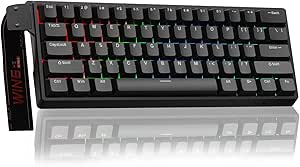 | Best 60% Pick for Rapid Trigger Tuning | Layout: 60% QWERTY, 61 keys | Switches: Graywood V3 linear magnetic, hot-swappable | Connectivity: Wired USB-C | VIEW LATEST PRICE | See Our Full Breakdown |
| Redragon K671 Wired Mechanical Gaming Keyboard with Hot-Swappable Red Switches |  | Best Value for Switch Customization | Layout: 104-key QWERTY | Connectivity: Wired | Switches: Hot-swappable linear red | VIEW LATEST PRICE | See Our Full Breakdown |
| Corsair K70 CORE RGB Full-Size Mechanical Gaming Keyboard with Detachable Palm Rest, Black |  | Best for Quieter Full-Size Gaming | Layout: 104-key US QWERTY | Connectivity: USB-A wired | Switches: Linear CORSAIR Red mechanical | VIEW LATEST PRICE | See Our Full Breakdown |
| SteelSeries Apex 5 Hybrid Mechanical Gaming Keyboard with OLED Display and RGB Lighting |  | Best for Clicky Feedback and Onboard Display | Layout: 104-key AZERTY | Connectivity: USB | Switches: Hybrid Blue, tactile and clicky | VIEW LATEST PRICE | See Our Full Breakdown |
| AULA F75 Pro 75% Wireless Hot-Swappable Mechanical Keyboard with Knob and RGB Backlighting |  | Best Compact Wireless Pick | Layout: 75%, 81-key QWERTZ | Connectivity: Bluetooth 5.0, 2.4GHz wireless, and USB-C wired | Device support: Up to 5 devices | VIEW LATEST PRICE | See Our Full Breakdown |
| Razer BlackWidow V4 X Mechanical Gaming Keyboard with Yellow Switches |  | Best for Quiet Macro-Heavy Gaming | Layout: 104-key QWERTY | Connectivity: Wired | Switches: Yellow linear and silent | VIEW LATEST PRICE | See Our Full Breakdown |
| mechanical gaming keyboard | Layout | Connectivity | Backlighting | Keycaps |
|---|---|---|---|---|
| Logitech G316 X 98 Mechanical | 98% QWERTY with numpad | Wired USB-A and USB-C | — | Double-shot PBT |
| Logitech G413 SE Full-Size Mec | Full-size QWERTY, 108 keys | Wired USB 2.0 | Single-color white LED | PBT |
| Redragon K580 Wired RGB Mechan | QWERTY, 104 keys | Wired USB-C | RGB | Double-shot |
| AULA WIN68 HE 68-Key Hall Effe | 68 keys; listed as 60% QWERTY | Wired USB-C, detachable cable | RGB, 16.8 million colors | — |
| AULA WIN60 HE 60% Wired Hall E | 60% QWERTY, 61 keys | Wired USB-C | — | — |
| Redragon K671 Wired Mechanical | 104-key QWERTY | Wired | 11 modes; adjustable brightness and speed; color not changeable | — |
| Corsair K70 CORE RGB Full-Size | 104-key US QWERTY | USB-A wired | Per-key RGB | Double-shot ABS |
| SteelSeries Apex 5 Hybrid Mech | 104-key AZERTY | USB | Per-key RGB | — |
| AULA F75 Pro 75% Wireless Hot- | 75%, 81-key QWERTZ | Bluetooth 5.0, 2.4GHz wireless, and USB-C wired | RGB, 16.8 million colors | Side-printed PBT |
| Razer BlackWidow V4 X Mechanic | 104-key QWERTY | Wired | Per-key Chroma RGB | Doubleshot ABS |
More Details on Our Top Picks
Logitech G316 X 98 Mechanical Gaming Keyboard, Linear Switches, Black
The Logitech G316 X 98 is my best all-around pick for players who want a numpad without giving a full-size keyboard all their desk space. Its 98% layout keeps number entry close at hand, while hot-swappable linear switches let owners change the typing feel later. Gasket mounting with silicone and foam layers is designed to soften keystroke noise, giving it a different focus from the more straightforward, full-size Logitech G413 SE. An 8 kHz report rate, PBT keycaps, and an onboard display and dial add gaming and everyday convenience. The tradeoff is a wired-only setup, and deeper lighting and software customization rely on G HUB. I’d choose it over the Redragon K580 when a tighter footprint and quieter-feeling construction matter more than clicky switches and onboard macro keys.
Pros:- 98% layout keeps the numpad while using less desk space than a full-size board
- Hot-swappable linear switches allow future switch changes
- Gasket mounting with silicone and foam layers is designed to dampen sound
- Onboard display and dial provide quick access to media and settings
Cons:- Wired USB connection limits placement flexibility
- Full RGB customization and other software features use G HUB
Best for: PC and laptop gamers who use a numpad for work or games but want to reclaim some desk space and customize linear switches.
Not ideal for: Players who need wireless placement, avoid Logitech G HUB, or want dedicated macro keys without software.
- Layout:98% QWERTY with numpad
- Switch type:Linear mechanical, hot-swappable
- Connectivity:Wired USB-A and USB-C
- Report rate:Up to 8 kHz
- Keycaps:Double-shot PBT
- Lighting:LIGHTSYNC RGB
- Controls:Dot-matrix LED display and dial
- Dimensions:15.12 × 5.51 × 1.57 in
Our verdict“Choose the G316 X 98 if you want a space-conscious wired gaming keyboard that retains a numpad and supports switch customization.”
Logitech G413 SE Full-Size Mechanical Gaming Keyboard
The Logitech G413 SE suits players who want a conventional full-size mechanical board with a sturdier-feeling top case, rather than adjustable switches or elaborate RGB effects. Its tactile switches offer a defined bump for each press, while PBT keycaps and an aluminum-magnesium alloy top case give it a more durable construction than the plastic enclosure of the AULA WIN68 HE. White-only backlighting keeps the setup simple, but it cannot match the colorful per-key customization available on the Redragon K580 or either AULA Hall Effect model. The full-size layout includes a numpad and function-row media shortcuts, though it takes more room than the G316 X 98 and offers no hot-swap option. I’d pick this for a dependable, conventional gaming and typing layout, not for players seeking extensive tuning.
Pros:- Tactile switches provide a distinct bump during typing and gameplay
- Aluminum-magnesium alloy top case is designed for a rigid feel
- PBT keycaps resist wear better than basic ABS keycaps
- Function-key media controls keep common commands within reach
Cons:- Single-color white backlighting offers less customization than RGB alternatives
- Full-size layout occupies more desk space than compact options
- Wired USB 2.0 connection limits placement flexibility
Best for: Gamers and typists who want a full-size wired keyboard with tactile switches, a metal top case, and simple backlighting.
Not ideal for: Desk-space-conscious players or enthusiasts who want RGB effects, hot-swappable switches, or adjustable actuation.
- Layout:Full-size QWERTY, 108 keys
- Switch type:Tactile mechanical
- Key rollover:6-key anti-ghosting
- Keycaps:PBT
- Backlighting:Single-color white LED
- Connectivity:Wired USB 2.0
- Top case:Aluminum-magnesium alloy
- Compatible operating systems:Windows and macOS
Our verdict“Choose the G413 SE if you want a sturdy, full-size wired board and can do without RGB and switch customization.”
Redragon K580 Wired RGB Mechanical Gaming Keyboard
The Redragon K580 is the pick for players who want clicky feedback and programmable shortcuts without depending on configuration software for macro recording. Its five onboard macro keys, dedicated media controls, and volume roller put frequent actions close by, while full anti-ghosting supports simultaneous inputs during busy gameplay. Compared with the Logitech G413 SE, the K580 adds RGB lighting, hot-swappable switches, and macro recording, but its Outemu Blue switches make a much louder typing sound. The double-shot keycaps are designed to resist fading, and the aluminum plate adds structure beneath its ABS enclosure. This is a feature-rich full-size wired option, not a quiet shared-room choice; players who want more adjustable actuation should look at the AULA WIN68 HE instead.
Pros:- Five onboard macro keys can record shortcuts without software
- Hot-swappable switches allow replacement without soldering
- Full anti-ghosting supports simultaneous key presses
- Dedicated media controls and a volume roller simplify adjustments
Cons:- Clicky Outemu Blue switches produce audible keystrokes
- Wired connection limits placement flexibility
- Full-size layout takes more desk space than compact alternatives
Best for: PC gamers who want audible clicky switches, onboard macro recording, and dedicated media controls on a full-size wired keyboard.
Not ideal for: People sharing a quiet room, or players who want adjustable Hall Effect actuation and a more compact layout.
- Layout:QWERTY, 104 keys
- Switch type:Clicky Outemu Blue, hot-swappable
- Connectivity:Wired USB-C
- Backlighting:RGB
- Keycaps:Double-shot
- Input features:Five programmable macro keys and full anti-ghosting
- Materials:ABS enclosure and aluminum plate
- Compatibility:Windows, macOS, Linux, and gaming consoles
Our verdict“Choose the K580 if onboard macro recording and clicky feedback matter more than quiet operation or compact size.”
AULA WIN68 HE 68-Key Hall Effect Gaming Keyboard
The AULA WIN68 HE is aimed at competitive players who want to tune key response without giving up arrow keys. Its 68-key layout leaves more room for mouse movement than the Logitech G413 SE, and Hall Effect magnetic switches allow adjustable actuation and per-key sensitivity. That makes it more focused on input tuning than the Redragon K580, whose appeal centers on clicky switches and onboard macro recording. The listed 8,000 Hz polling rate and 0.3 ms response time add to its speed-oriented feature set, while a detachable USB-C cable makes replacement or storage easier. The compromises are a plastic enclosure, a compact layout that sends extra commands through FN combinations, and a Windows-only web driver. I’d skip it if Mac-based customization or a familiar full-size layout is a priority.
Pros:- Adjustable actuation and per-key sensitivity let players tune input response
- 68-key layout retains arrow keys while saving desk space
- Up to 8,000 Hz polling rate and listed 0.3 ms response time target responsive play
- Detachable USB-C cable simplifies removal and replacement
Cons:- Web driver is not compatible with Mac
- Compact layout requires FN combinations for additional commands
- Plastic enclosure offers less substantial construction than the Logitech G413 SE’s metal-topped case
Best for: Windows competitive gamers who want adjustable magnetic-switch response, arrow keys, and a compact footprint for mouse movement.
Not ideal for: Mac users who need the configuration driver, or players who rely on a numpad and dedicated keys for less-used commands.
- Layout:68 keys; listed as 60% QWERTY
- Switch type:Hall Effect magnetic linear
- Actuation range:0.02–3.44 mm
- Polling rate:8,000 Hz
- Response time:0.3 ms
- Connectivity:Wired USB-C, detachable cable
- Backlighting:RGB, 16.8 million colors
- Compatible operating system:Windows
Our verdict“Choose the WIN68 HE if you are a Windows player seeking adjustable Hall Effect input in a compact board that keeps arrow keys.”
AULA WIN60 HE 60% Wired Hall Effect Gaming Keyboard
The AULA WIN60 HE takes the compact, magnetic-switch approach further than the WIN68 HE: its 61-key 60% layout saves more desk space, and its specified 0.02 mm rapid trigger step gives competitive players fine-grained control over repeated presses. Hot-swappable Graywood V3 linear magnetic switches and adjustable actuation make it a more tuning-focused choice than the tactile Logitech G413 SE, while web-based remapping and macros add options without relying on a bundled desktop app. That compactness comes with a real learning curve: arrow and navigation commands require key combinations, unlike the WIN68 HE, which retains arrow keys. It also requires Windows 10 or later and is listed as incompatible with PS5, PS4, and OBOX. I’d choose it for a PC setup built around mouse space and custom input, not broad device compatibility.
Pros:- 60% layout frees desk space for mouse movement and is easy to pack
- Hot-swappable magnetic switches support adjustable actuation and rapid trigger
- 0.02 mm rapid trigger step provides fine-grained input adjustment
- Web-based controls support remapping, macros, and RGB customization
Cons:- No dedicated arrow-key cluster; extra commands rely on key combinations
- Requires Windows 10 or later for listed operating system compatibility
- Not compatible with PS5, PS4, or OBOX
Best for: Windows 10-or-later PC gamers who want a very small keyboard, adjustable magnetic switches, and rapid-trigger tuning.
Not ideal for: Console players, Mac users, or anyone who regularly needs dedicated arrow and navigation keys without FN combinations.
- Layout:60% QWERTY, 61 keys
- Switches:Graywood V3 linear magnetic, hot-swappable
- Connectivity:Wired USB-C
- Polling rate:Up to 8,000 Hz
- Rapid trigger step:0.02 mm
- Lighting:Customizable RGB, 16.8 million colors
- Customization:Web-based key remapping and macro controls
- Compatible operating system:Windows 10 or later
- Keycap material:PBT
Our verdict“Choose the WIN60 HE if compact size and magnetic-switch tuning outweigh dedicated keys and wider device compatibility.”
Redragon K671 Wired Mechanical Gaming Keyboard with Hot-Swappable Red Switches
The Redragon K671 makes sense for a full-size gaming setup where replaceable switches matter more than wireless flexibility or elaborate lighting. Its hot-swappable linear reds let owners change compatible switches without soldering, and four spare switches are included. That gives it a customization advantage over the fixed-switch Corsair K70 CORE, though Corsair adds sound-dampening foam, per-key RGB, and a rotary media dial. The K671 also supports macros and key remapping, while full-key anti-ghosting helps register simultaneous inputs during busy gameplay. Its main visual limitation is that the backlight’s color cannot be changed; only its modes, brightness, and speed are adjustable. The keycap material is also inconsistently described as ABS in the details and PBT in the title, so I would not buy it expecting a specific material.
Pros:- Hot-swappable linear red switches allow compatible switch changes without soldering.
- Four spare switches are included.
- Macro editing and key remapping support personalized controls.
- Full-key anti-ghosting and 12 multimedia shortcuts suit gaming and everyday use.
Cons:- Backlight color cannot be changed, unlike the per-key RGB on the Corsair K70 CORE.
- Product details conflict on whether the keycaps are ABS or PBT.
- Wired connectivity limits placement flexibility.
Best for: Full-size keyboard buyers who want to experiment with compatible switches and remap keys without soldering.
Not ideal for: Players who want per-key RGB color customization, wireless play, or certainty about the keycap material.
- Layout:104-key QWERTY
- Connectivity:Wired
- Switches:Hot-swappable linear red
- Backlighting:11 modes; adjustable brightness and speed; color not changeable
- Key rollover:Full-key anti-ghosting
- Multimedia shortcuts:12
- Dimensions:17.13 × 4.88 × 1.42 in
- Warranty:24 months
Our verdict“Choose the K671 if switch swapping and macro control matter more to you than per-key RGB or wireless connectivity.”
Corsair K70 CORE RGB Full-Size Mechanical Gaming Keyboard with Detachable Palm Rest, Black
The Corsair K70 CORE is the strongest fit here for players who want a familiar full-size layout with a more restrained typing sound. Its pre-lubricated linear switches and two layers of sound-dampening foam are aimed at smoother, quieter keystrokes than the clicky SteelSeries Apex 5, which is better suited to people who actively want audible feedback. A programmable media button and rotary dial also make volume adjustments easy without leaving a game. The aluminum top plate and magnetic detachable palm rest add useful stability and support, while up to five onboard profiles keep settings available across sessions. The tradeoff is a wired-only USB-A connection and ABS keycaps rather than PBT. For switch swapping, the Redragon K671 offers a feature the K70 CORE does not.
Pros:- Pre-lubricated linear switches and dual sound-dampening foam support smoother, quieter typing.
- Per-key RGB and up to five onboard profiles allow personalized setups.
- Rotary dial and programmable media button provide quick audio control.
- Aluminum top plate and detachable magnetic palm rest add stability and support.
Cons:- USB-A wired connectivity restricts placement compared with the wireless AULA F75 Pro.
- Double-shot keycaps are ABS rather than PBT.
- Switches are not listed as hot-swappable, unlike those in the Redragon K671.
Best for: PC gamers who want a full-size linear keyboard with quieter keystrokes, onboard profiles, and convenient media controls.
Not ideal for: Wireless-focused players or buyers who prioritize hot-swappable switches or PBT keycaps.
- Layout:104-key US QWERTY
- Connectivity:USB-A wired
- Switches:Linear CORSAIR Red mechanical
- Backlighting:Per-key RGB
- Media controls:Multifunction rotary dial and programmable media button
- Onboard profiles:Up to 5
- Keycaps:Double-shot ABS
- Palm rest:Detachable magnetic soft-touch
Our verdict“Pick the K70 CORE for a quieter, feature-rich full-size wired setup, but choose the K671 if switch swapping is a priority.”
SteelSeries Apex 5 Hybrid Mechanical Gaming Keyboard with OLED Display and RGB Lighting
The SteelSeries Apex 5 is the lineup’s pick for players who want tactile, clicky feedback and a display built into the keyboard. Its OLED smart display can show customizable visuals and game information, a feature the more conventional Corsair K70 CORE does not offer. The hybrid Blue switches are a clear departure from the K70 CORE’s linear feel and the Redragon K671’s linear reds: they suit typists and gamers who want a more pronounced press, but their clickiness can be distracting in shared rooms. An aluminum alloy frame, per-key RGB, and magnetic wrist rest round out a full-size design. The listed AZERTY layout is a major fit issue for QWERTY users, and IP32 water resistance should not be mistaken for waterproofing.
Pros:- Tactile, clicky hybrid switches provide more audible and pronounced feedback than the linear K70 CORE.
- OLED display supports customizable visuals and game information.
- Per-key RGB allows individual lighting customization.
- Aluminum frame and magnetic wrist rest provide a sturdy base and palm support.
Cons:- AZERTY layout may be inconvenient for users who type on QWERTY.
- Clicky switches may be disruptive in shared or quiet rooms.
- IP32 water resistance does not make the keyboard waterproof.
Best for: AZERTY users who prefer clicky tactile switches and want an OLED display for customizable visuals or game information.
Not ideal for: QWERTY users, people gaming or typing in quiet shared spaces, and anyone seeking full waterproofing.
- Layout:104-key AZERTY
- Connectivity:USB
- Switches:Hybrid Blue, tactile and clicky
- Switch durability:Rated for 20 million keypresses
- Display:OLED smart display
- Backlighting:Per-key RGB
- Frame:Aluminum alloy
- Water resistance:IP32
Our verdict“Choose the Apex 5 if you want clicky feedback and an OLED display in an AZERTY layout, not if you need a quiet QWERTY board.”
AULA F75 Pro 75% Wireless Hot-Swappable Mechanical Keyboard with Knob and RGB Backlighting
The AULA F75 Pro is the clearest choice for a smaller desk or a setup that switches between several devices. Its 75% layout keeps arrow keys while trimming the full-size footprint of the Corsair K70 CORE, and its Bluetooth, 2.4GHz, and USB-C options support up to five devices. That versatility comes with a layout caveat: this model is QWERTZ, so buyers used to QWERTY may need time to adjust. The hot-swap sockets accept 3-pin and 5-pin switches, giving it broader switch-tuning potential than the fixed-switch K70 CORE, while side-printed PBT keycaps are a material distinction from that model’s ABS caps. A 4000mAh battery and multifunction knob add everyday convenience, but compact sizing means some full-size keys are absent.
Pros:- Bluetooth, 2.4GHz, and USB-C connectivity support up to five devices.
- Hot-swap sockets accept both 3-pin and 5-pin switches without soldering.
- Side-printed PBT keycaps are designed to resist fading and sweat.
- Compact layout retains arrow keys and adds a multifunction knob.
Cons:- QWERTZ layout differs from the QWERTY arrangement used by the Corsair K70 CORE.
- 75% format omits keys found on full-size boards.
- Wireless operation adds battery management that wired models do not require.
Best for: Gamers with limited desk space who want wireless device switching, arrow keys, and the option to replace switches.
Not ideal for: QWERTY-only users or players who rely on a full-size layout with every key readily available.
- Layout:75%, 81-key QWERTZ
- Connectivity:Bluetooth 5.0, 2.4GHz wireless, and USB-C wired
- Device support:Up to 5 devices
- Switches:Linear LEOBOG Reaper
- Hot-swap support:3-pin and 5-pin switches
- Keycaps:Side-printed PBT
- Battery:Rechargeable 4000mAh
- Backlighting:RGB, 16.8 million colors
Our verdict“Choose the F75 Pro for compact multi-device gaming and switch flexibility, provided QWERTZ and the reduced key set work for you.”
Razer BlackWidow V4 X Mechanical Gaming Keyboard with Yellow Switches
The Razer BlackWidow V4 X is built for players who want quiet linear inputs and several dedicated controls close at hand. Its Yellow switches have a listed 1.2 mm actuation distance and 45 g force, making them a distinct alternative to the tactile, clicky SteelSeries Apex 5; the built-in sound dampeners also suit shared spaces better than the Apex 5’s audible hybrid switches. Six programmable macro keys and dedicated media controls give it an advantage over the Corsair K70 CORE for players who assign commands to separate keys. Per-key Chroma RGB adds fine-grained lighting control. The tradeoffs are a wired-only connection, no water resistance, and ABS keycaps. Unlike the compact wireless AULA F75 Pro, this is a full-size board that takes more desk space.
Pros:- Quiet linear Yellow switches include sound dampeners.
- Six programmable macro keys provide dedicated command access.
- Dedicated media controls and per-key Chroma RGB add convenience and customization.
- Doubleshot ABS keycaps have labels designed not to wear off.
Cons:- Wired connectivity offers less placement flexibility than the wireless AULA F75 Pro.
- The keyboard is not water resistant.
- Full-size dimensions take more desk space than a 75% layout.
Best for: PC gamers who want quiet linear switches, six dedicated macro keys, and per-key RGB in a full-size layout.
Not ideal for: Wireless users, people who need water resistance, or players with limited desk space who prefer a compact board.
- Layout:104-key QWERTY
- Connectivity:Wired
- Switches:Yellow linear and silent
- Actuation:1.2 mm distance; 45 g force
- Macro keys:6 programmable
- Backlighting:Per-key Chroma RGB
- Keycaps:Doubleshot ABS
- Water resistance:Not water resistant
Our verdict“Choose the BlackWidow V4 X for quiet linear gaming and dedicated macros, but skip it if you need wireless use or a compact footprint.”
How We Picked
I ranked these keyboards around how well their layouts, switches, and controls suit gaming, then weighed how easily each can serve as a daily typing board. I looked at the practical impact of full-size, 98-key, 75%, 68-key, and 60% layouts; switch type; wired or wireless operation; hot-swap support; and useful extras such as a palm rest, knob, OLED display, or dedicated controls. The aim is to separate a versatile default choice from boards that make more sense for a particular desk setup or gaming preference.
The order favors balanced usability and a clear gaming benefit over feature count alone. That puts the Logitech G316 X 98 first as a compact-but-capable layout, with the Corsair K70 CORE RGB close behind for full-size comfort and the Hall effect AULA models ranked for players who specifically want that switch style. Simpler and more specialized options rank lower when their tradeoffs narrow their audience; a lower position does not mean a poor keyboard, just a less universal fit.
| mechanical gaming keyboard | Keycaps | Switches |
|---|---|---|
| Logitech G316 X 98 Mechanical | Double-shot PBT | — |
| Logitech G413 SE Full-Size Mec | PBT | — |
| Redragon K580 Wired RGB Mechan | Double-shot | — |
| AULA WIN68 HE 68-Key Hall Effe | — | — |
| AULA WIN60 HE 60% Wired Hall E | — | Graywood V3 linear magnetic, hot-swappable |
| Redragon K671 Wired Mechanical | — | Hot-swappable linear red |
| Corsair K70 CORE RGB Full-Size | Double-shot ABS | Linear CORSAIR Red mechanical |
| SteelSeries Apex 5 Hybrid Mech | — | Hybrid Blue, tactile and clicky |
| AULA F75 Pro 75% Wireless Hot- | Side-printed PBT | Linear LEOBOG Reaper |
| Razer BlackWidow V4 X Mechanic | Doubleshot ABS | Yellow linear and silent |
Factors to Consider When Choosing Mechanical Gaming Keyboards
Before choosing among these mechanical gaming keyboards, I would start with how you use your desk, not a feature checklist. The right layout and switch feel can matter more every day than an extra display or lighting effect, while customization is valuable only if you plan to use it.
Choose a Layout Around Your Games and Other Work
A compact keyboard frees room for wide mouse movements, which can help players who use low sensitivity. The tradeoff is that smaller layouts relocate or remove keys you may rely on for chat, shortcuts, spreadsheets, or navigation. A 60% board asks you to use function layers for keys that larger models keep in dedicated positions. Before buying, check which keys your regular games bind and whether you need a number pad for work. A 75% or 68-key board can preserve a more familiar cluster while still leaving extra mouse space. Do not assume you will adapt to missing keys just because the smaller footprint looks appealing.
Match Switch Behavior to Your Preferred Control
Linear switches move without a tactile bump, while tactile or hybrid designs give more feedback as a key actuates. Neither style is automatically faster or better; comfort and reliable control matter more than a label. Hall effect boards use magnetic sensing and may offer adjustable actuation, which can appeal to players who want finer control over key response. That feature can also add software decisions and may feel unfamiliar if you have only used conventional switches. If possible, try the switch style before committing, especially if the keyboard will handle long typing sessions as well as games. Avoid choosing solely by switch color, since naming conventions do not guarantee an identical feel across brands.
Decide Whether Customization Will Pay Off for You
Hot-swappable sockets let owners replace compatible switches without soldering, giving enthusiasts a way to change feel or replace a faulty switch. That flexibility has little value if you expect to keep the included switches and never open the board. Before buying, confirm which switch formats the keyboard accepts and whether replacement parts are easy for you to source. A removable switch also does not mean every component is user-serviceable. Buyers who want a ready-to-play keyboard may be better served by a simpler model with the controls and feel they already like. Treat modding as a feature to use, not a reason on its own to choose a board.
Think Through Wired Versus Wireless Use
A wired connection avoids charging and keeps the desk setup simple, which suits a keyboard that stays in one place. Wireless operation can reduce cable clutter and help when a board moves between devices, but the exact connection options and power arrangements vary by model. Check the product’s listed connectivity rather than assuming that a wireless keyboard supports every device or connection method you need. For competitive play, consider whether you want a cable-free setup more than you want to avoid battery upkeep. A detachable or routed cable can also make a wired desk easier to manage. Choose around your actual setup, not a general belief that one connection type is always superior.
Prioritize Useful Features Over Extra Effects
Lighting can help visibility or personalize a setup, but it does not improve key response by itself. A knob, dedicated media controls, an OLED display, or a palm rest can be more useful when they fit a routine you already have. Extras also take up space and may add software or configuration steps. Ask whether you will use a control while gaming or working, and whether it replaces a task you currently find inconvenient. A detachable palm rest is appealing if you value wrist support but less compelling if you prefer a bare, compact desk. The best feature set is the one that supports your habits without making the keyboard harder to use.
Frequently Asked Questions
Is a Hall effect keyboard a better choice for gaming than a conventional mechanical keyboard?
Not for every player. Hall effect designs such as the AULA WIN68 HE and WIN60 HE appeal to people who want magnetic switch sensing and adjustable response, while conventional mechanical models offer a more familiar switch experience. Your game, preferred key feel, and willingness to configure settings all matter. If you do not need adjustable actuation, a standard linear or tactile keyboard may be simpler to choose and use. Pick Hall effect for its specific control options, not because the technology alone guarantees better play.
Should I choose a 60% keyboard if I mainly play competitive games?
A 60% layout can create more room for mouse movement, which is useful for some competitive setups. It also removes dedicated keys that may be handy for shortcuts, communication, and everyday tasks. Think about whether you can comfortably access the missing keys through function layers, and whether your games rely on them. If you want extra mouse space but do not want to give up as many keys, compare 60% with 68-key or 75% layouts. The smallest board is only the right fit if its compromises work for your routine.
Is hot-swappable worth choosing if I have never changed keyboard switches?
It can be useful, but it is not a requirement for a good gaming keyboard. Hot-swapping gives you the option to try compatible switches or replace one without soldering, which suits curious owners and people who expect to customize. If you are happy with the included switch feel, the feature may go unused. Check compatibility before buying replacement switches, since hot-swap support does not mean every switch will fit. For a first keyboard, prioritize a layout and feel you like over modding potential.
How much does a compact keyboard affect typing and everyday use?
The impact depends on which keys the layout removes and how often you use them. A 98-key keyboard retains a number pad in a narrower footprint, while 75% and 68-key designs reduce dedicated keys but preserve more of a conventional layout than a 60% board. Function layers can restore access to missing commands, though they require practice and extra key combinations. If the keyboard will also serve work or school, list the keys you use most before choosing a compact format. A little desk space may not be worth repeated friction in everyday tasks.
Which features should I prioritize if one keyboard will handle both gaming and work?
Start with a layout that supports your regular tasks, since missing navigation or number keys can slow daily work. Then choose a switch feel you can tolerate for long typing sessions, not only short gaming sessions. A 98-key layout can be a useful middle ground if you want a number pad without a standard full-size footprint. Media controls, a knob, or a palm rest may help when they match how you work, but they should not outrank layout and comfort. If you switch between devices or move the board often, check its connectivity details before deciding.
Conclusion
For a versatile gaming-and-everyday setup, I would choose the Logitech G316 X 98 as best overall: its 98-key layout balances desk space with retained keys. The Logitech G413 SE is my best value-style pick for buyers who want a straightforward full-size mechanical board, while the Corsair K70 CORE RGB is the best premium-leaning choice for players drawn to its full-size format and detachable palm rest. For beginners, I would favor the familiar layouts and simpler switch choices of the Logitech G413 SE or Redragon K671 over a compact Hall effect board. Choose the AULA WIN68 HE for Hall effect controls in a smaller layout, the AULA WIN60 HE if the smallest footprint is your priority, or the AULA F75 Pro if wireless use and hot-swapping matter more. That leaves the Razer BlackWidow V4 X, Redragon K580, and SteelSeries Apex 5 as alternatives for buyers whose preferred switch feel or extra controls outweigh a more universal layout.
Black Friday Picks

Vitamix 62827 Vita-Prep Blender, Black, 32 oz
As an affiliate, we earn on qualifying purchases.