For most students, I’d start with the Lenovo Idea Tab 11-Inch 2.5K 90Hz with Pen and Folio Case: its sharp, smooth display and included writing accessories make it a well-rounded study pick. The Samsung Galaxy Tab S10 Lite is a stronger fit for students who want a more capable Samsung tablet, while the Lenovo Idea Tab Pro suits those who value a larger screen for split-screen work. The key tradeoffs are screen size, reliable performance, accessory quality, and whether a bundle’s extras matter more than a stronger tablet. I compare all 15 options by how well they fit real study routines, from note-taking and reading to typing and casual media use. Continue reading for the full breakdown and a recommendation matched to your needs.

Get the latest gadgets delivered free with Prime
- Fast, free delivery on millions of items
- Prime Video, Amazon Music and more included
- Member-only deals all year
Complete the kit



Key Takeaways
- The Lenovo Idea Tab 11-Inch 2.5K 90Hz with Pen and Folio Case is the strongest all-rounder in this lineup, pairing a high-resolution, faster-refresh display with study accessories in the box.
- The Samsung Galaxy Tab S10 Lite and Lenovo Idea Tab Pro target different upgrades: the Samsung is the more focused mid-size choice, while the Pro’s 12.7-inch screen favors split-screen work and larger documents.
- Included keyboards, mice, and styluses distinguish many budget bundles, but accessory count alone does not establish that a tablet will handle demanding coursework well.
- Several listings offer expandable storage, but advertised RAM and expansion figures need careful interpretation; check what is physical memory, virtual memory, and supported card capacity before choosing.
- Screen size creates a practical tradeoff across these picks: 10- to 10.1-inch models are easier to carry, 11-inch options give notes and reading more room, and the 12.7-inch Lenovo Pro is better suited to desk-based study.
| Lenovo Idea Tab 11-Inch 2.5K 90Hz Tablet with Pen and Folio Case, 8GB RAM, 256GB Storage | 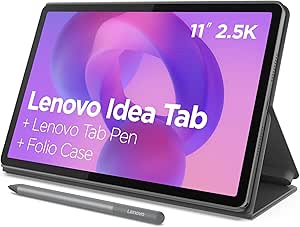 | Best Overall for Study and Note-Taking | Display: 11-inch 2.5K IPS touchscreen | Refresh rate: 90Hz | Processor: MediaTek Dimensity 6300 | VIEW LATEST PRICE | See Our Full Breakdown |
| TT.KIDS 11-Inch Android 16 Tablet Bundle with Keyboard, Mouse, Stylus, Case, and Headphones |  | Best All-in-One Accessory Bundle | Operating system: Android 16 | Display: 11-inch IPS | Memory: 3GB physical RAM plus 29GB virtual memory | VIEW LATEST PRICE | See Our Full Breakdown |
| Samsung Galaxy Tab A11+ 11-Inch Tablet, 6GB RAM, 128GB Storage, Expandable, Gray |  | Best for Battery Life and Media | Display: 11-inch, up to 90Hz | Memory: 6GB RAM | Storage: 128GB; microSD expansion supported | VIEW LATEST PRICE | See Our Full Breakdown |
| TECLAST P35 10.1-Inch Android 16 Tablet, Octa-Core, 32GB Storage, Widevine L1 |  | Best for Basic Schoolwork and Family Sharing | Display: 10.1-inch HD IPS, 1280 × 800 | Operating system: Android 16 | Processor: Unisoc T7200 octa-core | VIEW LATEST PRICE | See Our Full Breakdown |
| Lenovo Idea Tab 11-Inch 2.5K Tablet with Tab Pen and Folio Case |  | Best for Pen-Based Learning on a Leaner Setup | Display: 11-inch 2.5K IPS touchscreen, 90Hz | Processor: MediaTek Dimensity 6300, 2.4GHz | Memory: 4GB | VIEW LATEST PRICE | See Our Full Breakdown |
| CUPEISI CP31M 10.1-Inch Android Tablet, 128GB, with Keyboard, Mouse, Case, and Stylus | 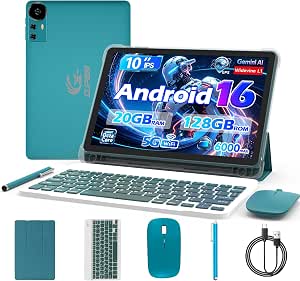 | Best All-in-One Study Bundle | Operating system: Android 16 | Display: 10.1-inch IPS touchscreen, 1280 × 800 | Processor: 2.0GHz octa-core | VIEW LATEST PRICE | See Our Full Breakdown |
| CUPEISI CP31M 10.1-Inch Android 16 Tablet, 20GB RAM, 128GB Storage, 2TB Expandable, Keyboard, Mouse, Stylus and Case, Pink |  | Best Colorful Bundle | Operating system: Android 16 | Display: 10.1-inch IPS touchscreen, 1280 × 800 | Processor: Octa-core T606, up to 2.0GHz | VIEW LATEST PRICE | See Our Full Breakdown |
| Samsung Galaxy Tab S10 Lite, 10.9-inch LCD, 6GB RAM, 128GB Storage, Gray |  | Best for Handwritten Notes | Model: Samsung Galaxy Tab S10 Lite, 10th Generation | Model year: 2025 | Display: 10.9-inch LCD | VIEW LATEST PRICE | See Our Full Breakdown |
| Jeazans 10.1-Inch Android 16 Tablet Bundle with Keyboard, Mouse, Stylus, and Case |  | Best for Basic Schoolwork | Operating system: Android 16 | Display: 10.1-inch IPS touchscreen, 800 × 1280 | Memory: 3GB RAM + 21GB virtual RAM | VIEW LATEST PRICE | See Our Full Breakdown |
| Tablet, 10.1 Inch Android 16 Tablets with Keyboard,24+64GB, 1TB Expansion |  | Best for a Low-Storage Starter Setup | Operating system: Android 16 | Display: 10.1-inch LCD, 1280 × 800 | Memory: 24GB listed (3GB RAM + 21GB virtual RAM) | VIEW LATEST PRICE | See Our Full Breakdown |
| ECOPAD K12E 10.1-Inch Android Tablet with Keyboard and Mouse, 12GB RAM, 64GB Storage, Black |  | Best for Laptop-Style Basics | Display: 10.1-inch IPS, 1280 × 800 | Operating system: Android 15 in description; Android 13 in item details | RAM: 12GB | VIEW LATEST PRICE | See Our Full Breakdown |
| COLORROOM 11-Inch Android 16 Tablet, 128GB, Blue |  | Best for Protected Everyday Study | Display: 11-inch, 1280 × 800 | Operating system: Android 16 | Processor: Unisoc T606 octa-core, up to 1.8GHz | VIEW LATEST PRICE | See Our Full Breakdown |
| Suicoey T901 10-Inch Android 16 Tablet Bundle with Keyboard |  | Best Accessory Bundle | Display: 10-inch IPS, 1280 × 800 | Operating system: Android 16 | Processor: T606 octa-core | VIEW LATEST PRICE | See Our Full Breakdown |
| Lenovo Idea Tab Pro 12.7-Inch Tablet with Pen and Folio Case |  | Best Premium Study Tablet | Display: 12.7-inch 3K LCD | Processor: MediaTek Dimensity 8300 | Memory: 8GB | VIEW LATEST PRICE | See Our Full Breakdown |
| TCL TAB 10 Gen 4 Android Tablet, 10.1-Inch FHD Display, 4GB RAM, 128GB Storage |  | Best Screen for Everyday Coursework | Display: 10.1-inch IPS FHD, 1920 × 1200, 16:10 | Operating system: Android 15 | Processor: Octa-core MediaTek | VIEW LATEST PRICE | See Our Full Breakdown |
| tablet computers for student | Display | Memory | Processor | Storage |
|---|---|---|---|---|
| Lenovo Idea Tab 11-Inch 2.5K 9 | 11-inch 2.5K IPS touchscreen | 8GB | MediaTek Dimensity 6300 | 256GB |
| TT.KIDS 11-Inch Android 16 Tab | 11-inch IPS | 3GB physical RAM plus 29GB virtual memory | Allwinner, 1.75GHz | 256GB built-in; MicroSD support up to 1TB |
| Samsung Galaxy Tab A11+ 11-Inc | 11-inch, up to 90Hz | 6GB RAM | — | 128GB; microSD expansion supported |
| TECLAST P35 10.1-Inch Android | 10.1-inch HD IPS, 1280 × 800 | 3GB physical RAM plus 13GB virtual expansion | Unisoc T7200 octa-core | 32GB internal; TF card support up to 2TB |
| Lenovo Idea Tab 11-Inch 2.5K T | 11-inch 2.5K IPS touchscreen, 90Hz | 4GB | MediaTek Dimensity 6300, 2.4GHz | 128GB |
| CUPEISI CP31M 10.1-Inch Androi | 10.1-inch IPS touchscreen, 1280 × 800 | 20GB listed (4GB RAM + 16GB memory expansion) | 2.0GHz octa-core | 128GB; expandable up to 2TB via microSD card, not included |
| CUPEISI CP31M 10.1-Inch Androi | 10.1-inch IPS touchscreen, 1280 × 800 | 20GB listed (4GB RAM + 16GB memory expansion) | Octa-core T606, up to 2.0GHz | 128GB; expandable up to 2TB via microSD card |
| Samsung Galaxy Tab S10 Lite | 10.9-inch LCD | 6GB RAM | Exynos 1380 | — |
| Jeazans 10.1-Inch Android 16 T | 10.1-inch IPS touchscreen, 800 × 1280 | 3GB RAM + 21GB virtual RAM | — | 64GB; expandable up to 1TB via TF card, not included |
| Tablet | 10.1-inch LCD, 1280 × 800 | 24GB listed (3GB RAM + 21GB virtual RAM) | — | 64GB; expandable up to 1TB |
| ECOPAD K12E 10.1-Inch Android | 10.1-inch IPS, 1280 × 800 | — | — | — |
| COLORROOM 11-Inch Android 16 T | 11-inch, 1280 × 800 | — | Unisoc T606 octa-core, up to 1.8GHz | — |
| Suicoey T901 10-Inch Android 1 | 10-inch IPS, 1280 × 800 | — | T606 octa-core | — |
| Lenovo Idea Tab Pro 12.7-Inch | 12.7-inch 3K LCD | 8GB | MediaTek Dimensity 8300 | 128GB |
| TCL TAB 10 Gen 4 Android Table | 10.1-inch IPS FHD, 1920 × 1200, 16:10 | 4GB physical RAM, plus 8GB expandable RAM | Octa-core MediaTek | 128GB internal; microSD up to 1TB |
More Details on Our Top Picks
Lenovo Idea Tab 11-Inch 2.5K 90Hz Tablet with Pen and Folio Case, 8GB RAM, 256GB Storage
For students who want one tablet for handwritten notes, reading, and downtime, this Lenovo balances a strong screen with useful included accessories. Its 11-inch 2.5K display gives text and diagrams more detail than the TECLAST P35’s 1280 × 800 panel, while the 90Hz refresh rate makes scrolling through long documents feel smoother. The included Tab Pen and folio case mean students can start annotating and prop the screen up for online classes without sourcing those extras separately. Compared with the 4GB Lenovo Idea Tab, this configuration’s 8GB RAM and 256GB storage offer more room for switching between apps and keeping course files. The tradeoff is that its stated 12-hour battery figure applies to YouTube playback, not every school-day workload; the included cable is USB-C 2.0.
Pros:- Tab Pen and folio case are included for note-taking and hands-free viewing.
- 2.5K, 90Hz display provides crisp text and smooth scrolling.
- 8GB RAM and 256GB storage offer more multitasking and file space than the 4GB Lenovo Idea Tab.
- Quad Dolby Atmos-tuned speakers suit recorded lectures and video calls.
Cons:- The up-to-12-hour battery claim is based on YouTube playback, not a mixed academic workload.
- The included charging cable is USB-C 2.0.
- The listed 20W charging setup may not suit students seeking faster charging.
Best for: Students who regularly annotate lecture slides, take handwritten notes, and keep course materials on their device.
Not ideal for: Students who need a confirmed full day of heavy classwork without charging or need more demanding performance than the listed processor and memory suggest.
- Display:11-inch 2.5K IPS touchscreen
- Refresh rate:90Hz
- Processor:MediaTek Dimensity 6300
- Memory:8GB
- Storage:256GB
- Battery:7216mAh; up to 12 hours of YouTube playback
- Audio:Quad Dolby Atmos-tuned speakers
- Included accessories:Lenovo Tab Pen, folio case, USB-C 2.0 charging cable
Our verdict“Choose this Lenovo for a well-equipped study tablet with a detailed screen, pen, and more memory than its 4GB sibling.”
TT.KIDS 11-Inch Android 16 Tablet Bundle with Keyboard, Mouse, Stylus, Case, and Headphones
The TT.KIDS bundle is aimed at students who want typing and basic input options in the box, rather than choosing a separate keyboard, mouse, and case. Its keyboard, wireless mouse, stylus, foldable case, and wired headphones cover common school and media tasks, giving it a different appeal from the Lenovo Idea Tab, which pairs a pen and folio with stronger listed display and memory specifications. The 256GB built-in storage plus MicroSD support up to 1TB leaves room for downloaded materials and files. The main compromise is performance headroom: its 3GB physical RAM is distinct from the advertised 29GB virtual portion, so I would not treat the 32GB total as equivalent to 32GB of working memory. Its stated seven-hour battery life also calls for more charging planning than Samsung’s longer stated runtime.
Pros:- Includes a keyboard, wireless mouse, stylus, case, and wired headphones.
- 256GB internal storage with support for up to 1TB MicroSD expansion.
- Wi-Fi 6 and Bluetooth 5.4 are specified for wireless connections.
- Widevine L1 support enables HD playback on compatible services.
Cons:- Only 3GB is physical RAM; virtual memory is not a substitute for physical RAM.
- Listed battery life is seven hours, shorter than the Samsung Galaxy Tab A11+ claim.
- The Allwinner processor is specified at 1.75GHz, with no performance benchmarks provided.
Best for: Students who want a ready-to-use tablet bundle for typing assignments, browsing, and watching lessons, especially if they need several accessories included.
Not ideal for: Students who keep many demanding apps open, need a higher-confidence all-day battery, or prefer a tablet with clearly stronger physical memory.
- Operating system:Android 16
- Display:11-inch IPS
- Memory:3GB physical RAM plus 29GB virtual memory
- Storage:256GB built-in; MicroSD support up to 1TB
- Processor:Allwinner, 1.75GHz
- Battery:7800mAh; listed battery life of 7 hours
- Wireless:Wi-Fi 6 (2.4GHz/5GHz), Bluetooth 5.4
- Included components:Keyboard, wireless mouse, stylus, foldable case, wired headphones
Our verdict“Pick the TT.KIDS if the included typing and pointing accessories matter more than stronger physical memory or longer stated battery life.”
Samsung Galaxy Tab A11+ 11-Inch Tablet, 6GB RAM, 128GB Storage, Expandable, Gray
The Galaxy Tab A11+ makes sense for students who want a familiar general-purpose tablet with room for notes, readings, and entertainment. Samsung lists up to 15 hours of battery life, the longest stated runtime among these five options, though actual class use will vary. Its 11-inch display supports up to 90Hz, and quad Dolby Atmos speakers add a fuller sound experience for recorded lectures than the TECLAST P35’s dual-purpose budget setup. Unlike the Lenovo Idea Tabs, the Samsung listing does not include a pen or folio, so handwriting-focused students should account for those missing accessories. The 128GB storage can be expanded with a separately sold microSD card, but the 25W fast charger is also sold separately. Its 6GB RAM sits between the two Lenovo configurations on paper.
Pros:- Stated battery life of up to 15 hours is longer than the other listed options here.
- Display supports refresh rates up to 90Hz.
- Quad Dolby Atmos speakers support clearer, more spacious playback.
- MicroSD expansion adds storage flexibility beyond the built-in 128GB.
Cons:- MicroSD card is sold separately.
- A 25W charger for fast charging is sold separately.
- No pen or folio case is listed among the included components.
Best for: Students who prioritize long stretches of reading, streaming, and everyday coursework and are comfortable buying a microSD card or charger separately.
Not ideal for: Students who want a pen and protective stand included, or who need the higher-resolution display and 256GB built-in storage of the 8GB Lenovo Idea Tab.
- Display:11-inch, up to 90Hz
- Memory:6GB RAM
- Storage:128GB; microSD expansion supported
- Battery:7040mAh; up to 15 hours
- Audio:Quad speakers with Dolby Atmos
- Front camera:5MP
- Included components:Data cable, ejection pin, quick start guide
- Warranty:2-year manufacturer warranty
Our verdict“Choose the Samsung for its long stated battery life and expandable storage, but not if you want pen and case accessories included.”
TECLAST P35 10.1-Inch Android 16 Tablet, Octa-Core, 32GB Storage, Widevine L1
The TECLAST P35 is the simplest fit here for students whose tasks are mostly reading, web research, and video lessons, with Kids Mode adding useful controls when a device is shared at home. Its 10.1-inch HD display is smaller and lower-resolution than the 11-inch Lenovo and Samsung screens, so dense PDFs and side-by-side documents have less room and detail. The P35 counters with TF card expansion up to 2TB, a headphone jack, and GPS—practical extras for basic use and travel. Its 3GB physical RAM, 32GB internal storage, and 1280 × 800 resolution make it a more limited schoolwork choice than the TT.KIDS bundle, which provides substantially more built-in storage. The listed 10–12-hour figure refers to video playback, and this model has no cellular connectivity.
Pros:- Kids Mode includes parental controls and separate profiles.
- TF card support is listed up to 2TB.
- Includes USB-C and a 3.5mm headphone jack.
- Widevine L1 supports HD streaming on compatible services.
Cons:- 1280 × 800 resolution is lower than the Lenovo Idea Tab’s 2.5K display.
- Only 3GB is physical RAM; virtual expansion does not provide equivalent working memory.
- 32GB internal storage is limited before adding a TF card, and cellular connectivity is not supported.
Best for: Younger students or families who need a basic Wi-Fi tablet for reading, online lessons, and supervised shared use.
Not ideal for: Students who work with large PDFs, multitask across several apps, need substantial built-in storage, or require mobile data access.
- Display:10.1-inch HD IPS, 1280 × 800
- Operating system:Android 16
- Processor:Unisoc T7200 octa-core
- Memory:3GB physical RAM plus 13GB virtual expansion
- Storage:32GB internal; TF card support up to 2TB
- Battery:6000mAh; up to 10–12 hours of video playback
- Cameras:2MP front, 5MP rear
- Connections:Dual-band Wi-Fi, Bluetooth 5.0, USB-C, 3.5mm headphone jack
Our verdict“Choose the P35 for basic supervised use and expandable storage, but skip it for demanding multitasking or detailed document work.”
Lenovo Idea Tab 11-Inch 2.5K Tablet with Tab Pen and Folio Case
This Lenovo keeps the study-focused essentials of the 8GB Idea Tab: a 2.5K, 90Hz screen, Tab Pen, folio case, and quad Dolby Atmos-tuned speakers. That makes it a strong match for annotating readings and taking handwritten notes without buying the pen and stand separately. Its defining compromise is the 4GB RAM and 128GB storage, half the memory and built-in space of the other Lenovo in this roundup. Students who mostly read, write, and keep a modest number of apps open may be comfortable with that configuration; those switching between heavier apps or storing lots of offline material should favor the 8GB model. The stated battery life is up to 12 hours, based on YouTube playback, and the included cable is USB-C 2.0.
Pros:- Tab Pen and folio case are included for handwritten notes and propped-up viewing.
- 2.5K IPS screen with a 90Hz refresh rate is well suited to reading and scrolling.
- Quad Dolby Atmos-tuned speakers support lecture playback and video calls.
- Includes a 20W charger.
Cons:- 4GB RAM gives less multitasking headroom than the 8GB Lenovo Idea Tab.
- 128GB storage is half the capacity of the other Lenovo model in this roundup.
- The up-to-12-hour battery claim is based on YouTube playback, and the listed cable is USB-C 2.0.
Best for: Students who want a pen-equipped tablet for notes and reading but have modest multitasking and local storage needs.
Not ideal for: Students who frequently juggle demanding apps or need plenty of space for offline textbooks, lecture recordings, and project files; the 8GB Lenovo offers more headroom.
- Display:11-inch 2.5K IPS touchscreen, 90Hz
- Processor:MediaTek Dimensity 6300, 2.4GHz
- Memory:4GB
- Storage:128GB
- Battery:7216mAh; up to 12 hours
- Audio:Quad Dolby Atmos-tuned speakers
- Included accessories:Lenovo Tab Pen, folio case, USB-C 2.0 charging cable
- Charging:20W charger
Our verdict“Choose this Lenovo for pen-based study and a sharp screen if 4GB RAM and 128GB storage fit your workload.”
CUPEISI CP31M 10.1-Inch Android Tablet, 128GB, with Keyboard, Mouse, Case, and Stylus
I’d put this CUPEISI CP31M near the top for students who want the basic laptop-style accessories included from the start. Its keyboard, mouse, stylus, and folding case cover typing, navigation, note marking, and stand support without requiring a separate accessory search. The 128GB storage is double the Jeazans bundle’s 64GB, and both models allow card expansion, though this CUPEISI supports a larger stated capacity of up to 2TB. Its 10.1-inch, 1280 × 800 screen is suited to readings and routine school apps, but it offers less detail than the Full HD display on the TCL TAB 10 Gen 4. The listed 6–8-hour battery life may also call for charging between longer classes. I’d choose it for bundle convenience, not demanding multitasking or high-resolution coursework.
Pros:- Keyboard, wireless mouse, stylus, and foldable protective case are included.
- 128GB internal storage with microSD expansion support up to 2TB.
- Dual-band Wi-Fi 6 supports 2.4GHz and 5GHz networks.
- Reading mode may make extended text viewing more comfortable.
Cons:- 1280 × 800 resolution is less detailed than the TCL TAB 10 Gen 4’s Full HD display.
- Listed battery life of up to 6–8 hours may be limiting for a full day away from an outlet.
- A microSD card for expanded storage is not included.
Best for: Students who want a keyboard, mouse, stylus, and case bundled for note-taking, basic writing, and online classes.
Not ideal for: Students who read dense PDFs for long sessions or need a sharper screen and longer stated battery runtime.
- Operating system:Android 16
- Display:10.1-inch IPS touchscreen, 1280 × 800
- Processor:2.0GHz octa-core
- Memory:20GB listed (4GB RAM + 16GB memory expansion)
- Storage:128GB; expandable up to 2TB via microSD card, not included
- Cameras:8MP rear, 2MP front
- Connectivity:Wi-Fi 6, 2.4GHz and 5GHz; Bluetooth 5.0
- Battery:6000mAh; listed runtime up to 6–8 hours
- Included accessories:Bluetooth keyboard, wireless mouse, stylus, foldable protective case, Type-C cable
Our verdict“Choose this CUPEISI if a ready-to-use study bundle and room for files matter more than display sharpness or all-day battery life.”
CUPEISI CP31M 10.1-Inch Android 16 Tablet, 20GB RAM, 128GB Storage, 2TB Expandable, Keyboard, Mouse, Stylus and Case, Pink
This pink CUPEISI CP31M serves students who want a coordinated, accessory-packed setup rather than a bare tablet. The keyboard and mouse support short writing assignments, while the stylus and folding case add options for handwritten notes and propped-up video lessons. Its 128GB storage matches the gray CP31M and exceeds the Jeazans bundle’s 64GB, with expansion support up to 2TB if a microSD card is added. Those two CUPEISI listings share the same core tradeoffs: a 1280 × 800 screen that is less crisp than the Samsung Galaxy Tab S10 Lite’s larger 10.9-inch display, and a battery described as roughly six hours on average. The 20GB figure includes memory expansion, not 20GB of physical RAM, so I’d treat it as a basic schoolwork option rather than a multitasking powerhouse.
Pros:- Includes keyboard, wireless mouse, stylus, and foldable protective case.
- 128GB storage with support for microSD expansion up to 2TB.
- Dual-band Wi-Fi 6 and Bluetooth 5.0 are listed.
- 10.1-inch IPS touchscreen suits basic reading, browsing, and video lessons.
Cons:- The 1280 × 800 display is lower resolution than the Samsung Galaxy Tab S10 Lite’s screen.
- The listed 20GB memory includes 16GB of expansion alongside 4GB RAM.
- Battery details indicate about six hours on average, and the expansion card is not included.
Best for: Students who prefer a pink tablet and want typing, stylus input, and a protective case included for everyday school tasks.
Not ideal for: Students who need a high-resolution screen, long unplugged study days, or substantial performance for demanding applications.
- Operating system:Android 16
- Display:10.1-inch IPS touchscreen, 1280 × 800
- Processor:Octa-core T606, up to 2.0GHz
- Memory:20GB listed (4GB RAM + 16GB memory expansion)
- Storage:128GB; expandable up to 2TB via microSD card
- Wireless connectivity:Wi-Fi 6 on 2.4GHz and 5GHz; Bluetooth 5.0
- Cameras:8MP rear, 2MP front
- Battery:6000mAh
- Color and included items:Pink; foldable case, keyboard, mouse, stylus, USB-C cable
Our verdict“Pick this pink CP31M for a bundled setup and expandable storage, but choose Samsung’s Galaxy Tab S10 Lite for a sharper, more note-focused experience.”
Samsung Galaxy Tab S10 Lite, 10.9-inch LCD, 6GB RAM, 128GB Storage, Gray
For students whose work centers on annotating readings or writing by hand, I’d favor the Samsung Galaxy Tab S10 Lite over the accessory bundles here. Its included S Pen gives note-taking and drawing a more central role than the basic stylus included with the CUPEISI CP31M or Jeazans tablet, while the 10.9-inch display provides more workspace than their 10.1-inch panels. Samsung’s Exynos 1380 and 6GB RAM also make this a more clearly specified choice for switching among school apps; the bundle tablets advertise larger memory figures that include virtual expansion. Storage starts at 128GB and can grow by microSD, like the CUPEISI options. The tradeoff is that the keyboard and mouse are not listed as included, and some AI functions depend on Samsung Notes or compatible apps. The 45W charger is sold separately.
Pros:- Included S Pen supports handwriting, drawing, and document annotation.
- 10.9-inch display offers more working area than the 10.1-inch bundle tablets.
- Exynos 1380 processor and 6GB RAM are specified for app multitasking.
- 128GB storage can be expanded with a microSD card up to 2TB.
Cons:- A keyboard and mouse are not listed among the included components.
- Some intelligent features are limited to Samsung Notes or compatible apps.
- The 45W charger needed for Super Fast Charging is sold separately.
Best for: Students who regularly annotate PDFs, write digital notes, or sketch and want an included S Pen and Samsung app features.
Not ideal for: Students who need a keyboard and mouse in the box or rely on a specific AI feature across all apps.
- Model:Samsung Galaxy Tab S10 Lite, 10th Generation
- Model year:2025
- Display:10.9-inch LCD
- Processor:Exynos 1380
- Memory:6GB RAM
- Internal storage:128GB
- Expandable storage:Up to 2TB via microSD card
- Included pen:S Pen
- Warranty:2 years
Our verdict“Choose the Galaxy Tab S10 Lite if pen-based study matters more than getting a keyboard and mouse in the box.”
Jeazans 10.1-Inch Android 16 Tablet Bundle with Keyboard, Mouse, Stylus, and Case
The Jeazans Jzpad-KB10L is a straightforward pick for students who want accessories for typing and casual note-taking without prioritizing large internal storage. Its keyboard, mouse, stylus, and protective case make it more ready for school tasks than a tablet-only setup, and Bluetooth 5.4 is a newer listed version than the Bluetooth 5.0 on the CUPEISI CP31M models. The tradeoff is its 64GB of built-in storage—half the CUPEISI’s 128GB—though a TF card can raise capacity to 1TB. Its 800 × 1280 IPS display has the same pixel dimensions as the CUPEISI’s 1280 × 800 panel, not a higher-resolution upgrade. With 3GB physical RAM plus virtual expansion, I’d keep expectations to browsing, reading, video calls, and routine assignments rather than heavy app switching.
Pros:- Keyboard, mouse, stylus, and protective case are included.
- Bluetooth 5.4 and dual-band Wi-Fi 6 are listed.
- Storage can be expanded up to 1TB using a TF card.
- USB-C fast charging is listed with the 6000mAh battery.
Cons:- 64GB built-in storage is less than the 128GB offered by either CUPEISI CP31M.
- The 3GB physical RAM figure is modest; virtual RAM does not replace physical memory.
- The 800 × 1280 display is not a Full HD panel, and the expansion card is not included.
Best for: Students handling web research, class videos, and short documents who want a keyboard and basic accessories bundled.
Not ideal for: Students who keep large offline course libraries or expect smooth performance from many demanding apps at once.
- Operating system:Android 16
- Display:10.1-inch IPS touchscreen, 800 × 1280
- Memory:3GB RAM + 21GB virtual RAM
- Storage:64GB; expandable up to 1TB via TF card, not included
- Battery:6000mAh
- Connectivity:Wi-Fi 6, Bluetooth 5.4, USB Type-C
- Cameras:Dual HD cameras
- Included components:Keyboard, mouse, protective case, stylus pen
- Warranty:One-year limited warranty
Our verdict“Choose the Jeazans bundle for basic school tasks and included accessories, but favor a 128GB model if you store many files on the tablet.”
Tablet, 10.1 Inch Android 16 Tablets with Keyboard,24+64GB, 1TB Expansion
This 10.1-inch Android 16 bundle is aimed at students who want a keyboard, mouse, stylus, case, and charger together, with Wi-Fi 6 and Bluetooth 5.4 listed for connectivity. Its 1280 × 800 display matches the resolution class of the CUPEISI CP31M and Jeazans, so none of these is the pick for especially crisp textbook pages. Storage is the bigger distinction: it has 64GB built in and supports expansion up to 1TB, while both CUPEISI CP31M listings start at 128GB and claim expansion to 2TB. The 24GB memory label includes 21GB of virtual memory alongside 3GB RAM, so I would not read it as a high-performance specification. The included PD charger is a useful extra, but battery capacity and runtime are not provided in the supplied details.
Pros:- Includes Bluetooth keyboard, wireless mouse, stylus, folding case, and PD fast charger.
- Dual-band Wi-Fi 6 and Bluetooth 5.4 are listed.
- 10.1-inch 1280 × 800 screen supports touch and stylus input.
- Storage can be expanded up to 1TB with a compatible card.
Cons:- 64GB internal storage is less than the 128GB included with the CUPEISI CP31M models.
- The listed 24GB memory combines 3GB RAM with 21GB virtual expansion.
- Battery capacity and expected runtime are not supplied, making day-long use harder to judge.
Best for: Students who want a bundled keyboard-and-accessory setup for online classes, basic documents, and light annotation.
Not ideal for: Students who need extensive built-in storage, clearly documented battery endurance, or verified performance for intensive multitasking.
- Operating system:Android 16
- Display:10.1-inch LCD, 1280 × 800
- Memory:24GB listed (3GB RAM + 21GB virtual RAM)
- Storage:64GB; expandable up to 1TB
- Connectivity:Dual-band Wi-Fi 6, Bluetooth 5.4
- Camera:Dual HD cameras; listed video capture resolution 720p
- Battery:18 watt-hours
- Included components:Bluetooth keyboard, wireless mouse, stylus, protective leather case, PD fast charger
- Warranty:Limited manufacturer warranty; duration not specified
Our verdict“Consider this bundle for its included accessories and charger, but choose a CUPEISI CP31M if you want more internal storage and a stated battery capacity.”
ECOPAD K12E 10.1-Inch Android Tablet with Keyboard and Mouse, 12GB RAM, 64GB Storage, Black
I’d pick the ECOPAD K12E for students who want a keyboard and mouse in the box for typing assignments and handling simple school tasks. That bundle gives it a more laptop-like starting point than the COLORROOM C5, which instead includes a protective case and has twice the stated internal storage. The K12E’s 64GB storage is modest for downloaded files and apps, but microSD expansion up to 1TB offers room to grow. Its 10.1-inch IPS display is practical for reading and browsing, though the 1280 × 800 resolution is less sharp than the TCL TAB 10 Gen 4’s FHD panel. I’d also check the operating-system listing before buying: the supplied information names both Android 15 and Android 13. The included accessories are useful, but the screen and software-detail inconsistency are real compromises.
Pros:- Keyboard and mouse are included for laptop-style typing and navigation.
- microSD expansion supports up to 1TB of additional storage.
- Wi-Fi 6 and Bluetooth 5.0 are listed.
- 10.1-inch IPS touchscreen suits everyday reading and browsing.
Cons:- 1280 × 800 resolution is less detailed than the TCL TAB 10 Gen 4’s FHD display.
- The listed operating system conflicts between Android 15 and Android 13.
- 64GB internal storage leaves less room for apps and offline coursework than the COLORROOM C5’s 128GB.
Best for: Students who mainly type short assignments, browse course materials, and want a keyboard and mouse included.
Not ideal for: Students who read dense PDFs, need a sharper screen, or require a clearly confirmed Android version.
- Display:10.1-inch IPS, 1280 × 800
- Operating system:Android 15 in description; Android 13 in item details
- RAM:12GB
- Internal storage:64GB
- Expandable storage:Up to 1TB via microSD
- Wireless:Wi-Fi 6, 2.4 GHz Wi-Fi, Bluetooth 5.0
- Battery:6000mAh
- Included components:Keyboard and mouse
Our verdict“Choose the ECOPAD K12E if included typing accessories matter more than screen sharpness, storage space, or an unambiguous OS listing.”
COLORROOM 11-Inch Android 16 Tablet, 128GB, Blue
The COLORROOM C5 is a sensible pick for students who want a case included and enough built-in space for apps, notes, and downloaded materials. Its 128GB storage is double the ECOPAD K12E’s capacity, while a microSD slot allows further expansion if a student keeps large media files. The bundled shock-proof case adds practical protection for a backpack, and the 8000mAh battery is larger than the ECOPAD’s 6000mAh cell. The tradeoff is that its 11-inch screen still has only 1280 × 800 resolution; the TCL TAB 10 Gen 4 offers a sharper FHD image on a smaller display. With 4GB RAM, I’d treat it as a tablet for reading, streaming, and routine school apps rather than heavy multitasking. The included case is a useful extra, but a microSD card must be purchased separately.
Pros:- 128GB internal storage provides more room than the ECOPAD K12E’s 64GB.
- Includes a shock-proof case for carrying between classes.
- 8000mAh battery and 18W charging are listed.
- Dual stereo speakers and expandable storage support media and coursework.
Cons:- 1280 × 800 resolution is lower than the TCL TAB 10 Gen 4’s 1920 × 1200 display.
- 4GB RAM may constrain demanding multitasking.
- MicroSD card for added storage is not included.
Best for: Students who want a protective case, generous built-in storage, and a large screen for reading, video lessons, and everyday apps.
Not ideal for: Students who need crisp text for long hours of PDF study or expect to run demanding apps and many tasks at once.
- Display:11-inch, 1280 × 800
- Operating system:Android 16
- Processor:Unisoc T606 octa-core, up to 1.8GHz
- RAM:4GB
- Internal storage:128GB
- Expandable storage:Up to 1TB via microSD
- Battery and charging:8000mAh; 18W charging
- Included components:Shock-proof case, USB cable, user manual
Our verdict“Choose the COLORROOM C5 for a case-included study and media tablet with ample built-in storage, not for high-resolution reading or demanding workloads.”
Suicoey T901 10-Inch Android 16 Tablet Bundle with Keyboard
The Suicoey T901 stands out for students who want a ready-to-use study setup: the bundle includes a keyboard, mouse, stylus, and protective case. Compared with the ECOPAD K12E, it adds a stylus and offers 256GB internal storage instead of 64GB, giving students more room for apps and offline materials before they need a microSD card. Its T606 octa-core processor and 4GB RAM point toward everyday study tasks rather than heavy creative work. The 10-inch, 1280 × 800 screen is also less spacious and sharp than the Lenovo Idea Tab Pro’s 12.7-inch 3K display, so the Lenovo is the stronger choice for detailed notes or split-screen study. Suicoey lists up to 16 hours of battery life, but cellular connectivity is absent and the expansion card is not included.
Pros:- Includes keyboard, mouse, stylus, and protective case.
- 256GB internal storage exceeds the ECOPAD K12E’s 64GB.
- microSD expansion is supported up to 2TB.
- 8000mAh battery is listed with up to 16 hours of life.
Cons:- 1280 × 800 display is less detailed than the Lenovo Idea Tab Pro’s 3K screen.
- No cellular connectivity is supported.
- microSD card for expansion is sold separately.
Best for: Students who want keyboard, mouse, stylus, and case accessories in one bundle for basic coursework and note-taking.
Not ideal for: Students who need mobile data away from Wi-Fi, a high-resolution screen, or verified performance for demanding software.
- Display:10-inch IPS, 1280 × 800
- Operating system:Android 16
- Processor:T606 octa-core
- RAM:4GB
- Internal storage:256GB
- Expandable storage:Up to 2TB via microSD; card not included
- Battery:8000mAh; listed for up to 16 hours
- Connectivity:Dual-band Wi-Fi, Bluetooth 5.0; no cellular
- Included accessories:Keyboard, mouse, stylus, protective case
Our verdict“Pick the Suicoey T901 if an all-in-one accessory bundle and ample built-in storage outweigh screen resolution and cellular access.”
Lenovo Idea Tab Pro 12.7-Inch Tablet with Pen and Folio Case
I’d rank the Lenovo Idea Tab Pro as the premium study choice for students who spend long sessions reading, annotating, and switching between schoolwork and entertainment. Its 12.7-inch 3K display gives documents and diagrams more room and detail than the 10- and 11-inch, 1280 × 800 panels on the Suicoey T901 and COLORROOM C5. The included Tab Pen Plus and folio case make it more study-ready than a bare tablet, while 8GB of memory and a Dimensity 8300 processor distinguish it from those budget-oriented options. Quad JBL speakers and Wi-Fi 6E add useful media and connectivity strengths. The tradeoff is its larger size, which is less convenient for a small backpack or one-handed use. Lenovo lists over 11 hours of video streaming, but does not specify battery capacity; some software features may vary by availability.
Pros:- 12.7-inch 3K display offers more detail and workspace than the smaller budget tablets here.
- Tab Pen Plus and folio case are included for note-taking and carrying.
- Dimensity 8300 processor and 8GB memory are stronger listed components than the T606 and 4GB in the Suicoey T901.
- Quad JBL speakers with Dolby Atmos and Wi-Fi 6E support media and modern wireless networking.
Cons:- Larger body is less convenient to carry and use one-handed than 10-inch options.
- Battery capacity and charging time are not specified, despite the listed 45W quick charging.
- Google Gemini and Circle to Search availability and compatibility may vary.
Best for: Students who annotate lecture materials, read detailed documents, or want a larger screen for study and entertainment.
Not ideal for: Students prioritizing a compact, lightweight tablet or a simple low-cost device for basic browsing and notes.
- Display:12.7-inch 3K LCD
- Processor:MediaTek Dimensity 8300
- Memory:8GB
- Storage:128GB
- Wireless:Wi-Fi 6E
- Audio:Quad JBL speakers with Dolby Atmos
- Battery life:Over 11 hours of video streaming
- Charging:45W quick charge
- Included accessories:Lenovo Tab Pen Plus and folio case
Our verdict“Choose the Lenovo Idea Tab Pro if a large, sharp display and included pen matter more than portability and clearly documented battery capacity.”
TCL TAB 10 Gen 4 Android Tablet, 10.1-Inch FHD Display, 4GB RAM, 128GB Storage
The TCL TAB 10 Gen 4 is my pick for students who value readable text and a light carry over bundled accessories. Its 1920 × 1200 FHD display is sharper than the 1280 × 800 panels on the COLORROOM C5 and Suicoey T901, which helps when reading slides, web pages, and documents on a 10.1-inch screen. At 0.87 pounds with a slim metal body, it is also easier to carry than the larger Lenovo Idea Tab Pro, though Lenovo provides a pen and folio case in the box. TCL includes 128GB storage, microSD expansion, parental controls, and Eye Comfort mode, making it a practical household or school tablet. Its 4GB physical RAM is suited to routine use, not demanding multitasking. Fast charging requires a compatible charger that is not included.
Pros:- FHD 1920 × 1200 display is sharper than the COLORROOM C5 and Suicoey T901 screens.
- Slim 0.87-pound metal body is convenient for carrying to class.
- 128GB storage with microSD expansion up to 1TB supports coursework and downloaded content.
- Kids Space, Family Link parental controls, and Eye Comfort mode add useful study and family features.
Cons:- 4GB physical RAM may limit demanding multitasking.
- Compatible charger for 18W fast charging is not included.
- Sound Booster does not work when using headphones.
Best for: Students who want a portable 10-inch tablet with a sharper display for reading, browsing, and standard school apps.
Not ideal for: Students who need an included stylus and folio, high memory for heavy multitasking, or a charging adapter in the box.
- Display:10.1-inch IPS FHD, 1920 × 1200, 16:10
- Operating system:Android 15
- Processor:Octa-core MediaTek
- Memory:4GB physical RAM, plus 8GB expandable RAM
- Storage:128GB internal; microSD up to 1TB
- Battery and charging:6000mAh; 18W fast charging; compatible charger not included
- Connectivity:Wi-Fi 5, Bluetooth 5.1, USB-C, 3.5mm headphone jack
- Weight and body:0.87 lb; unibody metal
- Cameras:5MP front, 8MP rear
Our verdict“Choose the TCL TAB 10 Gen 4 for a sharper, portable everyday study screen, but look to the Lenovo Idea Tab Pro if you need an included pen and more room for annotation.”
How We Picked
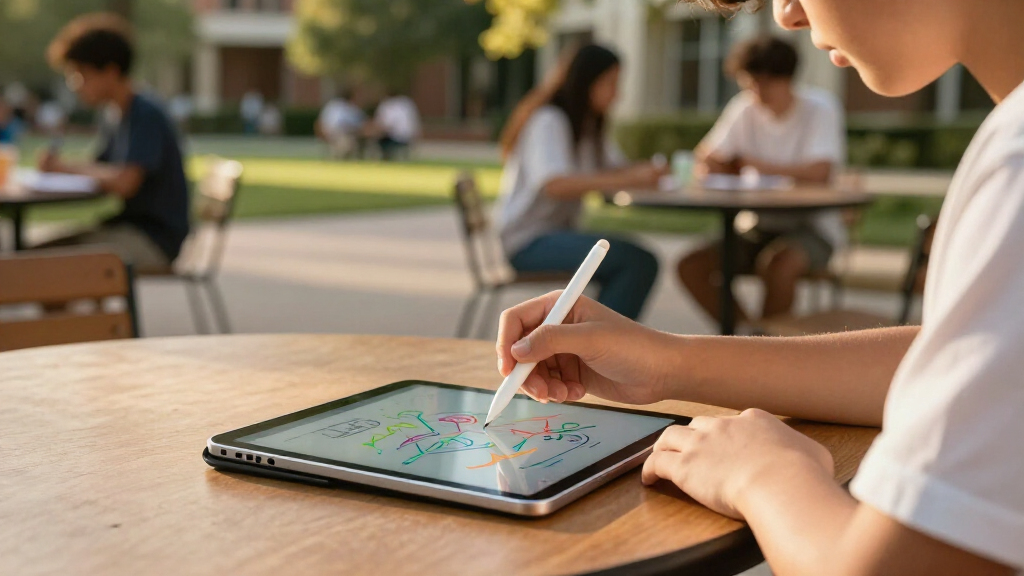
I ranked these tablet computers for students by how convincingly each matches common study tasks: reading course material, taking notes, joining online classes, typing short assignments, and handling everyday apps. I gave more weight to the tablet’s display, stated memory and storage, included pen or keyboard, and the usefulness of its size than to the number of accessories in a bundle. I also looked at how clearly each listing communicates its configuration; vague or unusually expansive memory claims make it harder for a student to judge what they are buying.
The order favors balanced, study-ready choices first, followed by models with a narrower advantage, such as a large screen, a lower-complexity starter setup, or a bundled keyboard. A pen and case can reduce the effort of setting up for class, but they do not erase limitations in performance or display. Since these listings do not provide a consistent basis for comparing long-term software support, battery life, or accessory quality, I avoid treating those as confirmed advantages. Students should verify app compatibility and school requirements before choosing.
| tablet computers for student | Operating system |
|---|---|
| Lenovo Idea Tab 11-Inch 2.5K 9 | — |
| TT.KIDS 11-Inch Android 16 Tab | Android 16 |
| Samsung Galaxy Tab A11+ 11-Inc | — |
| TECLAST P35 10.1-Inch Android | Android 16 |
| Lenovo Idea Tab 11-Inch 2.5K T | — |
| CUPEISI CP31M 10.1-Inch Androi | Android 16 |
| CUPEISI CP31M 10.1-Inch Androi | Android 16 |
| Samsung Galaxy Tab S10 Lite | — |
| Jeazans 10.1-Inch Android 16 T | Android 16 |
| Tablet | Android 16 |
| ECOPAD K12E 10.1-Inch Android | Android 15 in description; Android 13 in item details |
| COLORROOM 11-Inch Android 16 T | Android 16 |
| Suicoey T901 10-Inch Android 1 | Android 16 |
| Lenovo Idea Tab Pro 12.7-Inch | — |
| TCL TAB 10 Gen 4 Android Table | Android 15 |
Factors to Consider When Choosing Tablet Computers For Students
A student tablet needs to fit a routine, not just a spec sheet. I’d start with the work you expect it to do, then check whether the included accessories and storage suit that workload.
Match Screen Size to Your School Day
A tablet that looks spacious on a desk may feel cumbersome when carried between classes every day. Around 10 inches is a practical size for reading, browsing, and quick notes, while an 11-inch screen gives split-screen apps and handwritten pages more breathing room. A 12.7-inch model can make PDFs and side-by-side documents easier to view, but it takes up more space and may be less convenient to hold for long reading sessions. Think about whether you mostly study at a desk or work on the move before paying for extra screen area. A larger display does not automatically improve study comfort if you rarely use multitasking. Check the tablet’s dimensions alongside its screen measurement, since bezels and case bulk affect how it fits in a bag.
Treat Pen and Keyboard Bundles as a Starting Point
An included stylus or keyboard can make a tablet ready for class without a separate accessory search, but bundle contents are not a quality guarantee. For handwritten notes, check whether the pen supports the note-taking features your apps need and whether replacement tips or charging details are available. For typing, consider key spacing, layout, and whether the keyboard connects in a way that suits your setup. A bundled mouse may help at a desk, yet it adds little if you plan to take handwritten notes or use touch controls. Avoid choosing a device solely because its box lists the most accessories. If your coursework depends on long typing sessions, a dependable keyboard may matter more than a basic pen-and-mouse set.
Read Memory and Storage Claims Carefully
Storage determines how many downloaded readings, apps, and media files you can keep available without an internet connection. Expandable storage can help with documents and media, but a card does not always provide the same experience as built-in storage for apps. Some tablet listings combine physical RAM with virtual memory in their headline figures, so a larger advertised number may not mean the same thing as that amount of installed RAM. Compare the stated base memory and storage rather than relying on a bundle’s largest combined claim. If you use cloud storage consistently, a smaller built-in capacity may be workable; students who download large textbooks or recordings should plan more room. Confirm the tablet’s supported card capacity and whether your school apps allow files to be stored externally.
Prioritize App and School Compatibility
Before choosing a tablet, check the operating system and required apps against your school’s guidance. Learning platforms, video-call tools, testing software, and specialized course programs may have device or browser requirements that a general Android tablet does not meet. This matters more than a processor label when a course requires a particular desktop application or a managed device. Ask whether assignments must be completed in a specific file format or submitted through a supported app. If you rely on Google Play apps, confirm access rather than assuming every Android listing has the same setup. A tablet can be a useful companion for reading and notes without replacing a laptop for every subject.
Choose for the Heaviest Task You Actually Do
For reading, video lessons, and basic note-taking, a modest tablet can be enough; frequent multitasking and large documents put more pressure on performance. Do not pay for a specification you will rarely use, but avoid buying so narrowly that everyday coursework feels cramped. Students who keep several apps open should look beyond accessory bundles and pay attention to the tablet’s actual memory configuration. A smooth display can make scrolling and handwriting feel more responsive, but it cannot compensate for software that struggles with the apps you need. Consider whether the tablet will be your main study computer or a second screen alongside a laptop. That answer changes how much performance and screen area are worth prioritizing.
Plan for Carrying, Charging, and Long-Term Use
A student device gets handled and carried frequently, so a protective case and a manageable size can matter more day to day than a spec-sheet advantage. Check whether a case is included and whether it supports the viewing angles you need for lectures or typing. Verify the charging connection and included power accessories before relying on a bundle for campus use. Battery claims and software-support details are not consistently available across these listings, so look them up for the exact model before making a long-term choice. A tablet that fits your bag and can be charged with gear you already carry may be easier to use consistently. If the device must last through several years of coursework, support policy and repair options deserve attention alongside the initial configuration.
Frequently Asked Questions
Can one of these tablets replace a student laptop?
That depends on the software and assignments required by your school. A tablet with a keyboard can handle reading, web research, notes, email, and many document tasks, but it may not run desktop-only programs or specialized testing tools. Before treating one as your only computer, ask your school or instructors about required applications and file workflows. The larger Lenovo Idea Tab Pro offers more room for split-screen work, but a larger screen does not make Android equivalent to a laptop operating system. If your courses require desktop software, a tablet is better viewed as a companion device.
Is a tablet with an included keyboard a better choice than buying a separate keyboard?
An included keyboard can make a bundle convenient, especially when you want a ready-to-use setup for short assignments. It may not be the best fit for long essays if the keys are cramped or the layout differs from what you prefer. Check whether the keyboard attaches securely, works with the tablet’s case, and can be used at a comfortable angle. A separate keyboard gives you more choice, but adds another purchase and item to carry. Compare the actual typing setup you need rather than deciding by the word “bundle.”
How much storage should I choose for textbooks and class files?
Start by estimating how much material you keep downloaded, including textbooks, lecture recordings, and offline media. Students who mainly use cloud services and stream content may manage with less built-in storage than those who frequently work offline. Expandable storage can help with files, but confirm the supported capacity and whether the apps you use can save data to a card. Also distinguish built-in storage from advertised expansion capacity when comparing listings. Leaving spare space helps avoid constant file cleanup as apps and course materials accumulate.
Are the very high RAM figures in some budget tablet listings comparable to Samsung or Lenovo memory specs?
Not necessarily. Some listings combine installed physical RAM with virtual memory that uses storage, so headline totals can describe different configurations. Compare the stated physical RAM and built-in storage, and look for a clear explanation of any memory expansion feature. A large combined figure does not by itself show how well the tablet handles several demanding apps. If the listing is unclear, treat the claim cautiously and check the exact model details before relying on it for multitasking. This is especially relevant when comparing bundle-focused options with better-known Samsung and Lenovo models.
Should I choose an 11-inch tablet or the 12.7-inch Lenovo Idea Tab Pro for school?
An 11-inch tablet is usually easier to carry and hold, making it a sensible fit for students who move between classes or read on the go. The 12.7-inch Lenovo Idea Tab Pro gives more room for split-screen notes, documents, and larger pages, which can help when studying at a desk. That extra space brings a larger device to pack and handle, so it is not automatically the better choice for every student. Consider how often you work with two apps side by side and how much your tablet travels. If portability is the daily priority, the smaller size may serve you better than extra screen area.
Conclusion
For most students, my best overall pick is the Lenovo Idea Tab 11-Inch 2.5K 90Hz with Pen and Folio Case, because it combines a study-friendly display with useful accessories. For a best value-style choice, I’d compare the Lenovo Idea Tab 11-Inch 2.5K with Tab Pen and Folio Case against the keyboard bundles: choose the Lenovo when screen and note-taking matter more, and a bundle when typing accessories are the priority. The best premium pick for students who need more workspace is the Lenovo Idea Tab Pro 12.7-Inch; the Samsung Galaxy Tab S10 Lite is a more compact alternative for those who want a capable Samsung option. For a beginner, the TT.KIDS bundle supplies a broad set of accessories in one package, though its specs and compatibility should be checked against school needs. If your specific need is portability, compare the 10- to 10.1-inch models; if it is split-screen reading and writing, favor the larger Lenovo Pro. The right choice comes down to the task you need the tablet to handle most often, not the longest accessory list.