
For most buyers, I recommend the Revopoint POP 4 as the best overall 3D scanner in this group because it offers a versatile handheld route for general object capture. The Creality Sermoon S1 stands out for engineering-focused scanning, while the Revopoint MIRACO Plus suits buyers who want a self-contained workflow with photogrammetric support. The main choice is between portable convenience, finer detail and alignment needs, and the setup or software work required to get usable models. A scanner’s stated accuracy alone does not tell you how smoothly it will handle your object, so I weigh workflow and target fit alongside precision claims. Read on for the full breakdown and guidance on choosing among these 15 models.

Get the latest gadgets delivered free with Prime
- Fast, free delivery on millions of items
- Prime Video, Amazon Music and more included
- Member-only deals all year
Complete the kit



Key Takeaways
- The lineup splits by job: the Sermoon S1, MetroX Pro, Raptor Pro, and MetroY Ultra are geared toward more demanding technical capture, while the POP 4 and Ferret models fit broader handheld use.
- Portability comes in different forms: the MIRACO Plus offers a standalone approach, while compact handheld picks still depend on a connected device and compatible software.
- Accuracy figures are not directly interchangeable: scanning method, object size, surface, tracking, and alignment all affect whether a specification translates into a useful mesh.
- There are two similarly named POP 4 listings: compare the Standard and unqualified versions by included accessories and software bundle before choosing between them.
- Beginner fit is about workflow as much as hardware: a scanner that supports your devices and target objects can be easier to learn than a more technical model with a demanding setup.
| Revopoint POP 4 3D Scanner (Standard) |  | Best for Versatile Scanning | Single-frame accuracy: 0.03 mm | Volumetric accuracy: 0.03 mm + 0.05 mm × L(m) | Scanning modes: 5 | VIEW ON AMAZON | See Our Full Breakdown |
| Creality Sermoon S1 3D Scanner, Handheld Blue Laser Scanner for Engineering and 3D Printing |  | Best for Engineering Detail | Accuracy: 0.02 mm | Volumetric precision: 0.08 mm/m | Scan range: 5 mm–4,000 mm | VIEW ON AMAZON | See Our Full Breakdown |
| Creality CR-Scan Ferret 3D Scanner – Handheld, 30 FPS, 0.1mm Accuracy, Full Color, for Android, PC (Win 10/11) |  | Best Portable Pick for Color Scans | Accuracy: 0.1 mm | Resolution: 0.16 mm | Point-cloud capture: Up to 30 FPS | VIEW ON AMAZON | See Our Full Breakdown |
| Creality Otter Lite Basic 3D Scanner |  | Best for Dark and Metallic Objects | Accuracy: Up to 0.05 mm | Scanning speed: Up to 30 fps | Camera design: Four cameras: two long-focal and two short-focal lenses | VIEW ON AMAZON | See Our Full Breakdown |
| 3DMakerpro Fox Medium-Format 3D Scanner |  | Best for Beginner Hobbyists | Format: Medium-format | Accuracy: 0.07 mm | Resolution: 0.10 mm | VIEW ON AMAZON | See Our Full Breakdown |
| Revopoint MetroX Pro 3D Scanner – Blue Laser, Industrial-Grade Precision |  | Best for High-Precision Work | Precision: Up to 0.01 mm | Single-frame accuracy: Up to 0.02 mm | Volumetric accuracy: 0.02 mm + 0.04 mm × L (m) | VIEW ON AMAZON | See Our Full Breakdown |
| Creality Raptor Pro 3D Scanner with Scan Bridge | 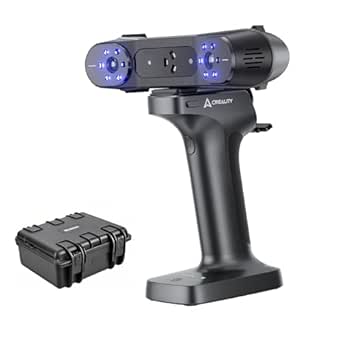 | Best for Wireless Color Capture | Accuracy: 0.02 mm under laboratory conditions | Scanning speed: Up to 60 FPS | Scanning rate: 660,000 points/second | VIEW ON AMAZON | See Our Full Breakdown |
| Revopoint INSPIRE 2 3D Scanner, Standard Edition |  | Best Portable Dual-Mode Pick | Accuracy: Up to 0.05 mm | Precision: Up to 0.03 mm | Weight: 190 g | VIEW ON AMAZON | See Our Full Breakdown |
| Creality CR-Scan Ferret Pro Wireless 3D Scanner |  | Best for Common File Exports | Accuracy: Up to 0.1 mm | Resolution: 0.16 mm | Scanning speed: Up to 30 FPS | VIEW ON AMAZON | See Our Full Breakdown |
| Creality Pika Portable 3D Scanner |  | Best On-Device Portability | Accuracy: 0.03 mm | Resolution: 0.1 mm | Scanning modes: 7-line blue laser, NIR structured light | VIEW ON AMAZON | See Our Full Breakdown |
| 3DMakerpro Moose Lite Premium Handheld 3D Scanner |  | Best for Beginner Friendly Detail | Precision: 0.05 mm | Scanning speed: 10 FPS | Tracking: AI visual tracking; marker-free | VIEW ON AMAZON | See Our Full Breakdown |
| Revopoint POP 4 3D Scanner |  | Best for Wide Object-Size Range | Single-frame accuracy: Up to 0.03 mm | Volumetric accuracy: 0.03 mm + 0.05 mm × L(m) | Full-field structured light accuracy: 0.08 mm | VIEW ON AMAZON | See Our Full Breakdown |
| Revopoint MIRACO Plus 3D Scanner with Photogrammetric Kit |  | Best Standalone Metrology Kit | Single-point accuracy: 0.04 mm | Photogrammetric length accuracy: 0.02 mm + 0.05 mm × L(m) | Processor and memory: 8-core 2.4 GHz processor; 32 GB RAM | VIEW ON AMAZON | See Our Full Breakdown |
| 3DMakerpro Fox 3D Scanner with 0.07mm Accuracy for 3D Printing |  | Best for Face and Body Scanning | Accuracy: 0.07 mm | Technology: Near-infrared (NIR) | Object-size range: 40–1200 mm | VIEW ON AMAZON | See Our Full Breakdown |
| Revopoint MetroY Ultra 3D Scanner (Standard) |  | Best for High-Precision Industrial Scanning | Single-frame accuracy: 0.01 mm | Volumetric accuracy: 0.015 + 0.04 mm × L(m) | Fused point distance resolution: 0.05 mm | VIEW ON AMAZON | See Our Full Breakdown |
| 3d scanner | Accuracy |
|---|---|
| Revopoint POP 4 3D Scanner | — |
| Creality Sermoon S1 3D Scanner | 0.02 mm |
| Creality CR-Scan Ferret 3D Sca | 0.1 mm |
| Creality Otter Lite Basic 3D S | Up to 0.05 mm |
| 3DMakerpro Fox Medium-Format 3 | 0.07 mm |
| Revopoint MetroX Pro 3D Scanne | — |
| Creality Raptor Pro 3D Scanner | 0.02 mm under laboratory conditions |
| Revopoint INSPIRE 2 3D Scanner | Up to 0.05 mm |
| Creality CR-Scan Ferret Pro Wi | Up to 0.1 mm |
| Creality Pika Portable 3D Scan | 0.03 mm |
| 3DMakerpro Moose Lite Premium | — |
| Revopoint POP 4 3D Scanner | — |
| Revopoint MIRACO Plus 3D Scann | — |
| 3DMakerpro Fox 3D Scanner with | 0.07 mm |
| Revopoint MetroY Ultra 3D Scan | — |
More Details on Our Top Picks
Revopoint POP 4 3D Scanner (Standard)
The POP 4 earns this role through its mix of scanning modes: it can handle tiny parts, larger objects, and dark or reflective surfaces, with a stated scan volume from 10 mm cubes to 2 m cubes. Its 0.03 mm single-frame accuracy suits detailed capture, while WiFi 6 adds flexibility for mobile preview and scanning. Compared with the Creality Sermoon S1, which has a lower stated accuracy figure and marker-free tracking, the POP 4 emphasizes mode variety, outdoor tolerance, and AI features. Those extras come with separate costs: the outdoor filter, battery grip, and professional measurement and design software are sold separately. Some AI tools and paid software also require Windows, and maximum frame rates need an NVIDIA GPU.
Pros:- Five scanning modes cover different object sizes and surface challenges
- 0.03 mm stated single-frame accuracy supports fine-detail capture
- WiFi 6 enables wireless scanning and mobile preview
- Outdoor light tolerance reaches 100,000 lux with the optional filter in laser mode
Cons:- Outdoor filter, battery grip, and professional software are sold separately
- AI segmentation and paid Revo Measure and Revo Design software are Windows only
- NVIDIA hardware is required for the maximum stated frame rate
Best for: Makers and technical users who need one scanner for varied object sizes, surfaces, and indoor or outdoor settings
Not ideal for: Buyers who want a complete professional workflow included or rely on macOS for AI segmentation and paid measurement tools
- Single-frame accuracy:0.03 mm
- Volumetric accuracy:0.03 mm + 0.05 mm × L(m)
- Scanning modes:5
- Minimum scan volume:10 × 10 × 10 mm
- Maximum scan volume:2 × 2 × 2 m
- Maximum frame rate:105 fps with multi-line laser and NVIDIA GPU
- Connectivity:WiFi 6.0
- Software:Revo Scan 6 included; Revo Measure and Revo Design sold separately
Our verdict“Choose the POP 4 if scanning flexibility across varied objects and surfaces matters more than having every accessory and software tool included.”
Creality Sermoon S1 3D Scanner, Handheld Blue Laser Scanner for Engineering and 3D Printing
For engineering work, the Sermoon S1 pairs a stated 0.02 mm accuracy with three blue-laser modes, including a single line for deep holes. Its 5 mm to 4 m scan range spans small components and large structures, so a workshop can use one device across different jobs. The four-lens stereo system supports marker-free scanning, which can reduce setup time compared with marker-based workflows. Against the Revopoint POP 4, the Sermoon S1 offers a finer stated accuracy figure and compatibility with both Windows and macOS, while the POP 4 lists more scanning modes and wireless WiFi 6. This is a more demanding choice for the computer: the recommended Windows setup calls for 32 GB of RAM, and handheld precision scanning may take practice.
Pros:- 0.02 mm stated accuracy targets detailed engineering capture
- Three blue-laser modes include a dedicated single-line deep-hole mode
- 5 mm to 4 m scanning range covers very small parts through large structures
- Marker-free stereo vision and AI-assisted software can reduce setup and cleanup
Cons:- Recommended Windows configuration requires an i7 10th Gen processor and 32 GB RAM
- Precision handheld scanning may require a learning period
- Volumetric precision of 0.08 mm/m affects accuracy across larger scans
Best for: Reverse-engineering and inspection teams scanning components, deep features, and large structures on a capable computer
Not ideal for: First-time hobbyists with basic computers who want a low-setup learning experience
- Accuracy:0.02 mm
- Volumetric precision:0.08 mm/m
- Scan range:5 mm–4,000 mm
- Laser modes:34 crossed lines, 7 parallel lines, and single line
- Scan speed:90 FPS
- Deep-hole detection:0.1 mm
- Vision technology:4-lens stereo vision
- Compatibility:Windows and macOS
Our verdict“Pick the Sermoon S1 for detailed engineering scans across a broad size range if you have the computer and time to learn its workflow.”
Creality CR-Scan Ferret 3D Scanner – Handheld, 30 FPS, 0.1mm Accuracy, Full Color, for Android, PC (Win 10/11)
The CR-Scan Ferret makes portability and textured models its main draw. Its built-in RGB camera captures color, while the ASIC chip supports up to 30 FPS point-cloud capture; power-bank operation helps when scanning away from a desk. The stated 0.1 mm accuracy and 0.16 mm resolution fit general 3D-printing projects, though they are less suited to fine engineering work than the Creality Sermoon S1, whose stated accuracy is 0.02 mm. The Ferret’s 560–820 mm wide-range coverage is useful for larger subjects, but the supplied specs do not give the same broad small-to-large range as the Sermoon S1. Mobile use also has limits: the base model supports Android scanning, while its requirements call for modern hardware and WiFi 6.
Pros:- Built-in RGB camera captures full-color textures
- ASIC chip supports up to 30 FPS point-cloud capture
- Power-bank or compatible Android-device power supports portable use
- Wide-range mode covers 560–820 mm
Cons:- 0.1 mm accuracy is less suited to fine engineering detail than the Sermoon S1
- Base-model mobile scanning is supported on Android, not iOS
- Requires modern hardware, including 8 GB RAM and WiFi 6 for Android
Best for: 3D-printing hobbyists who want portable scanning and color textures for medium or larger subjects
Not ideal for: Engineering users who need the finest stated accuracy or iPhone-based mobile scanning
- Accuracy:0.1 mm
- Resolution:0.16 mm
- Point-cloud capture:Up to 30 FPS
- Image processing:Up to 60 FPS
- Wide-range scan coverage:560–820 mm
- Color capture:Full-color RGB camera
- Power:5V power bank or compatible Android device
- Android requirements:Android 10+, 8 GB RAM, WiFi 6
Our verdict“Choose the Ferret for portable, color-textured scans for 3D printing, and look to the Sermoon S1 for tighter engineering tolerances.”
Creality Otter Lite Basic 3D Scanner
The Otter Lite Basic is a practical fit when surface finish complicates scanning. It can capture dark and metallic objects without spray, and its four-camera setup covers objects from 0.8 to 78 inches. At up to 0.05 mm accuracy and 30 fps, it sits between the entry-level feel of the CR-Scan Ferret and the engineering focus of the Sermoon S1; the supplied figures put it ahead of the Ferret for stated accuracy but below the Sermoon S1. Marker, geometry, and texture alignment give users options for different objects, and exports include common formats such as STL, OBJ, and 3MF. The main caveat is that the optional Scan Bridge handle is sold separately, and its listed sunlight tolerance is lower than the POP 4’s stated outdoor tolerance.
Pros:- Scans dark and metallic surfaces without scanning spray
- Four-camera design supports a broad object-size range
- 24-bit color capture adds texture information to models
- Exports to PLY, OBJ, STL, ASC, 3MF, GLTF, and FBX
Cons:- Optional Scan Bridge handle is sold separately
- 0.05 mm stated accuracy is less fine than the Sermoon S1’s 0.02 mm
- Sunlight tolerance is up to 30,000 lux, below the POP 4’s stated tolerance with its outdoor filter
Best for: Makers scanning dark, shiny, or metallic parts who want color capture and multiple alignment methods
Not ideal for: Buyers who need the highest stated precision for engineering inspection or strong outdoor-light capability
- Accuracy:Up to 0.05 mm
- Scanning speed:Up to 30 fps
- Camera design:Four cameras: two long-focal and two short-focal lenses
- Object size range:0.8–78 inches
- Color capture:24-bit
- Sunlight tolerance:Up to 30,000 lux
- Alignment modes:Marker, geometry, and texture
- Software compatibility:CrealityScan 4 for Windows, macOS, iOS, and Android
Our verdict“Pick the Otter Lite Basic when scanning challenging dark or metallic surfaces is a priority and its accuracy fits your project.”
3DMakerpro Fox Medium-Format 3D Scanner
The 3DMakerpro Fox keeps the focus on approachable medium-format scanning for hobby and 3D-printing projects. Its markerless AI feature recognition can resume tracking after losing the object, reducing the need to restart a scan. JMStudio brings scanning, editing, and model optimization into one software environment, which may suit beginners better than the engineering-oriented setup of the Creality Sermoon S1. The tradeoff is a narrower stated performance profile: the Fox lists 0.07 mm accuracy and 0.10 mm resolution, but the supplied data does not specify scan speed, object-size limits, or platform compatibility. It is a simpler fit for general modeling and inspection tasks, while users needing the Sermoon S1’s stated 0.02 mm accuracy or defined deep-hole capabilities should choose a more specialized scanner.
Pros:- Markerless AI tracking can recover after losing the object
- 0.07 mm stated accuracy suits many hobby modeling tasks
- JMStudio includes scanning, editing, and model optimization
- Designed for 3D printing, modeling, measurement, and quality inspection
Cons:- The supplied specifications do not state scan speed or object-size limits
- 0.07 mm accuracy is less fine than the Sermoon S1’s stated 0.02 mm
- The supplied data does not specify operating-system compatibility
Best for: Beginners and hobbyists scanning medium-format objects for 3D printing, modeling, or basic inspection
Not ideal for: Engineering teams needing documented scan-speed, size-range, or deep-feature specifications
- Format:Medium-format
- Accuracy:0.07 mm
- Resolution:0.10 mm
- Tracking:Markerless AI feature recognition
- Software:JMStudio
- Intended uses:3D printing, modeling, measurement, and quality inspection
Our verdict“Choose the Fox for a markerless, medium-format start in hobby scanning, but select the Sermoon S1 for documented engineering precision.”
Revopoint MetroX Pro 3D Scanner – Blue Laser, Industrial-Grade Precision
The MetroX Pro is the precision-focused choice here, with stated precision up to 0.01 mm and four scanning modes for switching between laser capture, structured light, and turntable work. That range suits inspection or reverse-engineering workflows where the scan method needs to adapt to the part. Its HD RGB camera also adds color capture, while feature and marker tracking offer different ways to keep scans aligned. Compared with the portable INSPIRE 2, this model is far heavier at nearly 15 lb and is less suited to mobile work; its specs instead favor a more stationary setup. The tradeoffs are substantial weight and paid add-on software for design and measurement, with advanced software limited to Windows.
Pros:- Stated precision reaches 0.01 mm
- Four scanning modes cover laser, structured-light, and automatic turntable workflows
- Tracking supports feature, marker, and global marker modes
- HD RGB camera captures color alongside geometry
Cons:- At 14.82 lb, it is cumbersome to carry between jobs
- Revo Design and Revo Measure are paid add-ons
- Advanced software is limited to Windows
Best for: Engineering teams and experienced makers who prioritize fine-detail scanning for inspection, reverse engineering, or 3D printing at a fixed workstation.
Not ideal for: Traveling users and buyers who need a light handheld scanner or an included scan-to-CAD and measurement workflow.
- Precision:Up to 0.01 mm
- Single-frame accuracy:Up to 0.02 mm
- Volumetric accuracy:0.02 mm + 0.04 mm × L (m)
- Scanning modes:30 cross-line lasers, 15 parallel lines, 62-line full-field structured light, auto turntable
- Maximum scan speed:Up to 7,000,000 points/second (structured light); up to 2,000,000 points/second (laser)
- Color capture:HD RGB camera
- Weight:14.82 lb
Our verdict“Choose the MetroX Pro for high-precision, mode-flexible scanning at a workstation if its weight and separately sold software fit your workflow.”
Creality Raptor Pro 3D Scanner with Scan Bridge
The Raptor Pro with Scan Bridge pairs wireless scanning with full-color texture mapping, making it a fit for users who want to move around a subject without giving up surface color. Its stated accuracy reaches 0.02 mm under laboratory conditions, and capture runs at up to 60 FPS. The included bridge is a practical distinction from the CR-Scan Ferret Pro, which also supports wireless phone scanning but is specified at up to 0.1 mm accuracy. The Raptor Pro’s single capture range is 270 × 170 mm at 300 mm, so larger objects may take more passes, and its accuracy caveat matters outside laboratory conditions. At 12.17 lb, it is also less inviting for frequent travel than the 190 g INSPIRE 2.
Pros:- Included Scan Bridge enables wireless scanning
- Full-color 3D texture mapping
- Capture rate reaches up to 60 FPS
- Stated accuracy is up to 0.02 mm under laboratory conditions
Cons:- Accuracy specification is qualified for laboratory conditions
- Single capture range is 270 × 170 mm at 300 mm
- 12.17 lb weight limits portability
Best for: Workshop users who need wireless scanning and color texture capture for objects within a manageable handheld capture area.
Not ideal for: Mobile creators who need a lightweight scanner, or users who need a documented capture range wider than 270 × 170 mm per frame.
- Accuracy:0.02 mm under laboratory conditions
- Scanning speed:Up to 60 FPS
- Scanning rate:660,000 points/second
- Object size range:5–2000 mm
- Single capture range:270 × 170 mm at 300 mm
- Color mapping:Full-color 3D scanning
- Weight:12.17 lb
- Included wireless accessory:Scan Bridge
Our verdict“Pick the Raptor Pro if wireless color capture matters more than low weight or a wider single-frame capture area.”
Revopoint INSPIRE 2 3D Scanner, Standard Edition
At just 190 g, the INSPIRE 2 is the easiest scanner in this group to bring along, yet it offers both infrared structured light and multi-line laser scanning. That pairing gives buyers more flexibility with reflective or dark surfaces than the CR-Scan Ferret Pro, whose description warns that those materials may be difficult. Accuracy is specified up to 0.05 mm, below the MetroX Pro’s 0.01 mm figure, so the INSPIRE 2 is better framed as a portable general-purpose tool than a precision inspection choice. Built-in Wi-Fi 6 supports wireless scanning, and the included tripod, mini turntable, markers, and calibration board make it ready for varied setups. Outdoor use is limited to up to 20,000 lux, and Revo Design costs extra and is Windows-only.
Pros:- Lightweight 190 g body is easy to carry
- Infrared structured light and multi-line laser modes
- Designed to scan reflective and dark surfaces without spray
- Includes tripod, mini turntable, markers, and calibration board
Cons:- Up to 0.05 mm accuracy is less fine than the MetroX Pro’s stated 0.01 mm precision
- Outdoor scanning is limited to up to 20,000 lux
- Revo Design is a paid add-on and supports Windows only
Best for: Makers and field technicians who need a lightweight scanner for varied surfaces and want a useful accessory kit in the box.
Not ideal for: Users doing high-precision inspection or bright outdoor scans beyond the stated 20,000-lux limit.
- Accuracy:Up to 0.05 mm
- Precision:Up to 0.03 mm
- Weight:190 g
- Connectivity:Wi-Fi 6.0, USB Type-C
- Laser lines:11 infrared laser lines
- Outdoor scanning:Up to 20,000 lux
- Optical zoom:Adjustable 1.5× and 2×
- Included software:Revo Metro
Our verdict“Choose the INSPIRE 2 for portable, surface-flexible scanning with a bundled setup kit, rather than the finest stated precision.”
Creality CR-Scan Ferret Pro Wireless 3D Scanner
The CR-Scan Ferret Pro is a straightforward handheld option for buyers who value broad device compatibility and familiar export formats. It works with Windows, Mac, Android, and iPhone 11 or later, and saves to OBJ, STL, and PLY, which makes it easier to move scan files into common modeling and printing workflows. Its stated accuracy reaches 0.1 mm, less precise than the INSPIRE 2 at 0.05 mm or the MetroX Pro at 0.01 mm, so it fits general capture better than fine inspection. Wireless phone scanning needs the dedicated Wi-Fi 6 bridge; the product data does not say the bridge is included. Reflective, transparent, and very dark surfaces can also be difficult, unlike the INSPIRE 2’s stated surface flexibility.
Pros:- Compatible with Windows PC, Mac, Android, and iPhone 11 or later
- Exports OBJ, STL, and PLY files
- Scanning speed reaches up to 30 FPS
- Supports outdoor ambient light up to 30,000 lux
Cons:- Up to 0.1 mm accuracy is lower than the INSPIRE 2 and MetroX Pro specifications
- May struggle with reflective, transparent, or very dark surfaces
- Wireless phone scanning requires the dedicated bridge
Best for: Hobbyists who scan on a mix of computers and compatible phones and need standard mesh file exports for printing or editing.
Not ideal for: Buyers scanning reflective, transparent, or very dark objects, or those who need higher stated accuracy and wireless phone scanning without a separate bridge requirement.
- Accuracy:Up to 0.1 mm
- Resolution:0.16 mm
- Scanning speed:Up to 30 FPS
- Wireless connectivity:Wi-Fi 6 bridge required
- Export formats:OBJ, STL, PLY
- Outdoor ambient light:Up to 30,000 lux
- Compatible devices:Windows PC, Mac, Android, iPhone 11 or later
- Weight:2.81 lb
Our verdict“The Ferret Pro suits cross-device hobby workflows with standard exports, provided its surface limits and bridge requirement match your setup.”
Creality Pika Portable 3D Scanner
The Creality Pika packs a broad stated scan range, dual capture modes, and a touchscreen into a 260 g handheld body. Its 7-line blue laser and NIR structured light span objects from 10 mm miniatures to 2000 mm subjects, while Wi-Fi 6 and dual swappable batteries help when working away from a desk. Compared with the INSPIRE 2, the Pika adds a built-in display and states higher accuracy at 0.03 mm; the INSPIRE 2 is lighter and also offers dual modes. Pika’s 110 FPS figure and support for black and metallic surfaces add appeal for varied jobs. The small 3-inch screen can constrain detailed edits, and marker-free scanning is limited to wired PC mode, narrowing its wireless convenience.
Pros:- 260 g body with Wi-Fi 6 supports portable scanning
- Blue laser and NIR structured-light modes cover varied subjects
- Stated 0.03 mm accuracy and 110 FPS capture
- Dual swappable batteries and 3-inch touchscreen are built in
Cons:- Marker-free scanning is available only in wired PC mode
- The 3-inch touchscreen is small for detailed editing
- Broad scan range does not remove the need to choose the appropriate mode and setup for each subject
Best for: Makers who want a self-contained, portable scanner for small parts through full-body capture and value an onboard screen and swappable batteries.
Not ideal for: Users who need marker-free wireless scanning or a larger display for detailed on-device review and editing.
- Accuracy:0.03 mm
- Resolution:0.1 mm
- Scanning modes:7-line blue laser, NIR structured light
- Frame rate:110 FPS
- Scan range:10 × 10 × 10 mm to 2000 × 2000 × 2000 mm
- Connectivity:Wi-Fi 6, USB
- Weight:260 g
- Battery:Dual swappable 3350 mAh batteries
- Compatible platforms:Windows, macOS, iOS, Android
Our verdict“Choose the Pika for a portable, screen-equipped scanner spanning small parts to full-body subjects, if wired PC mode is acceptable for marker-free work.”
3DMakerpro Moose Lite Premium Handheld 3D Scanner
The Moose Lite pairs 0.05 mm precision with marker-free tracking, making it a practical fit for makers who want detailed scans without setting up tracking markers. Its anti-shake module and re-scanning feature can help when a session is interrupted or a beginner’s pass needs another attempt. Compared with the 3DMakerpro Fox, it offers finer stated precision and broader device compatibility, while the Fox specifies a wider object-size range and eye-safe NIR face scanning. The Moose Lite is best matched to medium-sized objects; its 3.65-pound weight also makes extended handheld work less comfortable than a lighter scanner may be. JMStudio supports Android, iOS, Windows, and MacOS, though the supplied details do not establish how performance varies across those platforms.
Pros:- Stated 0.05 mm precision for capturing fine object details
- Marker-free scanning with AI visual tracking and automated model repair
- Anti-shake module and re-scanning function can make sessions easier to manage
- Compatible with Android, iOS, Windows, and MacOS, with lifetime free OTA updates
Cons:- Best suited to medium-sized objects rather than very large or tiny items
- At 3.65 pounds, it is relatively heavy for prolonged handheld scanning
Best for: 3D printing hobbyists scanning medium-sized parts who want marker-free tracking and guided recovery from interrupted sessions.
Not ideal for: Users who regularly scan very large or tiny objects, or who need a lighter device for long handheld sessions.
- Precision:0.05 mm
- Scanning speed:10 FPS
- Tracking:AI visual tracking; marker-free
- Compatibility:Android, iOS, Windows, MacOS
- Software:JMStudio with lifetime free OTA updates
- Weight:3.65 pounds
Our verdict“Choose the Moose Lite if you want detailed, marker-free scans of medium-sized objects with beginner-friendly recovery features.”
Revopoint POP 4 3D Scanner
The POP 4’s defining advantage is its 10 mm to 2 m scan-volume range, which lets one scanner cover small precision parts and much larger components. Five scanning modes and wireless operation give it more flexibility across different capture situations than the 3DMakerpro Moose Lite, which is positioned for medium-sized objects. The POP 4 also lists up to 0.03 mm single-frame accuracy, though that figure should be read alongside its separate volumetric and full-field accuracy specifications. Its battery grip is rated for up to four hours, useful for work away from a desk. The tradeoff is a more involved software picture: Revo Scan 6 is included, while Revo Design and Revo Measure are separate purchases and Windows-only; AI segmentation is also limited to Windows.
Pros:- Broad stated scan-volume range from 10 mm objects up to 2 m
- Five scanning modes for different capture needs
- Wireless Wi-Fi 6 connectivity and battery grip rated for up to four hours
- AI object segmentation and photorealistic texturing features
Cons:- AI object segmentation is Windows-only
- Revo Design and Revo Measure are sold separately and support Windows only
Best for: Makers and technicians who need one wireless scanner to capture objects ranging from small parts to large components.
Not ideal for: Buyers who need AI segmentation or design and measurement tools on a non-Windows computer, or who want those extra applications included.
- Single-frame accuracy:Up to 0.03 mm
- Volumetric accuracy:0.03 mm + 0.05 mm × L(m)
- Full-field structured light accuracy:0.08 mm
- Scan volume:10 × 10 × 10 mm minimum to 2 × 2 × 2 m maximum
- Scanning modes:5
- Connectivity:Wi-Fi 6
- Battery grip:5500 mAh; up to 4 hours
- Included software:Revo Scan 6
Our verdict“Pick the POP 4 if object-size flexibility and wireless scanning matter more than an all-included software suite.”
Revopoint MIRACO Plus 3D Scanner with Photogrammetric Kit
The MIRACO Plus stands apart as an all-in-one scanner with photogrammetric metrology: its 0.04 mm single-point accuracy is paired with a stated photogrammetric length accuracy of 0.02 mm + 0.05 mm × L(m). The included scale bars and coded targets support that measurement workflow, while the built-in processor, screen, and storage mean scanning does not require a PC at the capture stage. Compared with the Revopoint POP 4, which offers wireless flexibility and a broad scan-volume range, the MIRACO Plus emphasizes standalone operation and measurement hardware. That setup comes with constraints: continuous scanning is rated for up to two hours, and Revo Design scan-to-CAD software is sold separately. Its software is specified for x86_64 architecture, a compatibility detail buyers should check against their workstation.
Pros:- Standalone scanning with integrated 8-core processor, display, RAM, and storage
- Photogrammetric kit includes four scale bars and 208 coded targets
- Stated 0.04 mm single-point accuracy and photogrammetric length accuracy specification
- 750 g body with Wi-Fi 6, USB Type-C, and fast charging
Cons:- Continuous scanning battery life is limited to up to two hours
- Revo Design scan-to-CAD software is sold separately
- Software is specified for x86_64 architecture, which may limit workstation compatibility
Best for: Metrology and engineering teams that need portable, PC-free capture with photogrammetric scale bars and coded targets.
Not ideal for: Users seeking long uninterrupted scanning sessions or an included scan-to-CAD workflow.
- Single-point accuracy:0.04 mm
- Photogrammetric length accuracy:0.02 mm + 0.05 mm × L(m)
- Processor and memory:8-core 2.4 GHz processor; 32 GB RAM
- Storage:256 GB
- Display:6-inch 2K AMOLED, 180° flip screen
- Weight:750 g
- Battery life:Up to 2 hours continuous scanning
- Photogrammetric kit:4 carbon fiber scale bars; 208 coded targets
Our verdict“Choose the MIRACO Plus if you need portable, standalone scanning with an included photogrammetric measurement kit.”
3DMakerpro Fox 3D Scanner with 0.07mm Accuracy for 3D Printing
The Fox is the lineup’s clearest choice for buyers who want to scan faces or bodies: its near-infrared technology is described as eye-safe for those uses, and its 40 mm to 1200 mm object range covers small and medium subjects. Markerless tracking and anti-shake compensation reduce setup demands, which suits STEM projects and DIY prototyping. Compared with the 3DMakerpro Moose Lite, the Fox has a broader stated object-size range but lower stated accuracy, at 0.07 mm versus 0.05 mm. That makes the Moose Lite the more compelling pick when fine detail on medium objects is the priority. The Fox also asks more of its operator and computer: best results involve a learning curve, some 3D modeling familiarity, and a capable PC with a dedicated GPU strongly recommended.
Pros:- Near-infrared technology described as eye-safe for face and body scanning
- 40 mm to 1200 mm stated object-size range
- Markerless tracking with anti-shake compensation
- JMStudio supports OBJ, STL, PLY, and ASC exports
Cons:- A dedicated GPU is strongly recommended for smooth PC performance
- Getting strong results involves a learning curve and some 3D modeling familiarity
- Its stated 0.07 mm accuracy is lower than the Moose Lite’s 0.05 mm
Best for: STEM educators and DIY makers who want to scan faces, bodies, or medium-sized objects for 3D printing projects.
Not ideal for: Buyers who need the finest stated detail, have no capable PC with a dedicated GPU, or want a minimal learning curve.
- Accuracy:0.07 mm
- Technology:Near-infrared (NIR)
- Object-size range:40–1200 mm
- Optimal working distance:150–400 mm
- Tracking:Markerless with anti-shake
- Software and exports:JMStudio; OBJ, STL, PLY, ASC
- PC requirement:Dedicated GPU strongly recommended
- Warranty:1 year
Our verdict“Pick the Fox for eye-safe face and body scanning on a capable PC, and consider the Moose Lite if finer stated accuracy matters more.”
Revopoint MetroY Ultra 3D Scanner (Standard)
The MetroY Ultra targets demanding part capture with 0.01 mm single-frame precision, blue laser and structured-light modes, and a stated ability to scan dark or shiny surfaces without spray. Five modes give it options for different parts and capture setups; Wi-Fi 6 and a 450 g scanner body also make it more portable than the standalone MIRACO Plus, though the MetroY’s battery grip is rated for about 2.5 hours. It can scan outdoors in bright sunlight up to 100,000 lux, a useful distinction for field work. The tradeoff is computing demand: full-speed performance calls for an NVIDIA GPU, and the listed Windows minimum includes an RTX 3060 and 32 GB RAM. Buyers should match their workstation to those requirements before choosing it for routine production work.
Pros:- Stated 0.01 mm single-frame precision
- No-spray scanning for dark, glossy, or metallic surfaces
- Five scanning modes for varied parts and capture setups
- Wi-Fi 6, 450 g scanner body, and outdoor capability up to 100,000 lux
Cons:- Listed Windows minimum requires an RTX 3060, 32 GB RAM, and a recent high-performance CPU
- Full 90 FPS capture requires an NVIDIA GPU
- Battery grip is rated for about 2.5 hours of portable use
Best for: Industrial technicians and engineers digitizing small to medium parts, including dark or reflective surfaces, with a workstation that meets the listed requirements.
Not ideal for: Casual makers or laptop-only users without the specified computing capacity who do not need industrial-level precision.
- Single-frame accuracy:0.01 mm
- Volumetric accuracy:0.015 + 0.04 mm × L(m)
- Fused point distance resolution:0.05 mm
- Scanning speed:Up to 90 FPS with NVIDIA GPU; 60 FPS with CPU
- Scanning modes:5
- Connectivity:USB, Wi-Fi 6
- Weight and battery:450 g; 5500 mAh grip, about 2.5 hours
- Outdoor capability:Up to 100,000 lux sunlight
- Windows minimum:Intel i7 13th Gen or AMD Ryzen 7 5800; 32 GB RAM; NVIDIA RTX 3060 (8 GB)
Our verdict“Choose the MetroY Ultra for high-precision industrial part scanning if your computer meets its demanding requirements.”

How We Picked
I ranked these 3D scanners by how well their stated capabilities match common buyer jobs: general object capture, 3D printing, engineering work, portability, and larger or more detailed subjects. I considered the scanning approach and published precision claims alongside practical factors such as device compatibility, whether the workflow requires a host computer or phone, and how specialized the scanner appears to be. Those factors matter because a scanner can have strong headline specifications yet be a poor fit for a buyer’s objects or working setup.
The ranking favors versatility and a manageable workflow for the best overall position, then gives specialist models their place when their technical focus justifies a narrower audience. Portable options rank well for convenience, while engineering-oriented scanners rise for buyers who need more controlled capture and are prepared for added setup. I also account for bundle differences and naming overlap, since accessories and editions can change what a buyer receives. Manufacturer specifications describe intended capability; results still depend on scan conditions, surface treatment, alignment, and software.
Factors to Consider When Choosing 3d Scanners
Choosing a 3D scanner starts with the object and the result you need, not the largest precision number on a product page. I would work through these factors before deciding which workflow and scanner class make sense for your projects.
Match the scanner to object size and detail
Small parts with fine edges place different demands on a scanner than furniture, body parts, or larger mechanical assemblies. A model aimed at small and medium subjects may capture detail well but require more passes or careful alignment on a large object. Conversely, a scanner suited to broader coverage may not preserve tiny features as well as you need for fitting parts. Measure representative objects and identify the smallest feature that must survive into the mesh. A common mistake is choosing from a precision claim without checking the intended scan range. If your projects vary widely, versatility may be more useful than a narrow advantage on one object size.
Treat accuracy as one part of the workflow
Published accuracy can help narrow a shortlist, but it does not guarantee that a scan will match your intended use. Surface finish, geometry, movement, scan distance, lighting, and registration can all affect the final model. Glossy, dark, transparent, or featureless objects may need preparation or a different capture approach. For reverse engineering, also ask how you will inspect, align, and export the data after capture. Buyers often focus on the scanner’s stated number and overlook the tolerance needed by their actual project. Decide what error your print or fit can tolerate, then evaluate the full capture and processing chain against that need.
Check device compatibility before choosing portability
A handheld scanner can be convenient while still relying on a computer, phone, cable, or companion application. Check the supported operating systems and device requirements against the equipment you already own. A standalone unit such as the MIRACO Plus can reduce dependence on a host during capture, while connected models may better fit a desk-based workflow. Wireless operation can ease movement around an object, but it does not automatically make processing simpler. Confirm how files move from capture to editing and whether the software supports your preferred export formats. Compatibility surprises can turn a portable purchase into a workflow that requires extra hardware.
Choose a capture method that suits your objects
Different scanners use different approaches to capture shape, and each can favor particular object conditions or working distances. Blue laser options in this group target more technical capture, while other handheld models focus on accessible general scanning. Photogrammetric support can help with larger subjects by combining image information, but it adds steps and depends on consistent source images. Think about whether you can rotate the object, move around it, or hold the scanner steadily. Buyers sometimes select a method based on its label without considering how they will physically scan their usual subjects. A practical match between capture method and object handling often saves more time than a small specification advantage.
Budget time for software and scan cleanup
A scanner produces capture data, but many projects still need alignment, hole repair, mesh cleanup, or scaling before the model is ready to print or engineer against. Ask whether the included software covers those tasks and whether it works on your computer. More technical models can reward careful setup, yet they may demand more operator attention than a casual user expects. For frequent production work, repeatability and export control may matter more than the quickest first scan. For occasional printing, a simpler workflow can make a less specialized scanner the better fit. Look at the complete path from first capture to the file your downstream software can use.
Compare editions and included accessories
Two listings with similar names may differ in accessories, software access, or the intended workflow. This roundup includes both a POP 4 Standard listing and a POP 4 listing without that edition label, so I would verify the exact contents before treating them as interchangeable. A scan bridge, photogrammetric kit, or other accessory can change how a product fits a particular job. Check what is included in the specific bundle and whether any essential component is sold separately. Do not assume the word “Pro,” “Lite,” or “Premium” means the same upgrade across different brands. Comparing the actual package prevents selecting a scanner that lacks a needed mounting or capture component.
Frequently Asked Questions
Is a scanner with a higher stated accuracy always better for 3D printing?
No. The useful question is whether the scanner can capture the features and tolerances your printed part needs under your working conditions. Surface finish, tracking, alignment, and mesh processing affect the final model, so a headline accuracy figure alone is an incomplete guide. For decorative reproductions, ease of capture may matter more than very fine precision. For parts that must mate with existing components, compare the full workflow and plan to verify dimensions in your modeling software.
Should I choose a standalone scanner or a handheld model that connects to my computer?
Choose based on where and how you plan to scan. A standalone approach can simplify capture away from a desk, while a connected model may fit better if you already process scans on a compatible computer. Check operating system support, file transfer, and whether you can review scans during capture. Portability does not remove the need for post-processing, so consider where that work will happen. The best fit is the one that works with your devices and the places where your objects are located.
Can one scanner handle both small mechanical parts and large objects?
Some scanners can cover a range of objects, but one device may not be equally convenient or detailed across that range. Small parts call for close capture and reliable preservation of fine features; large objects call for coverage, tracking, and consistent alignment across passes. Before choosing a versatile model, identify the most demanding object you expect to scan and the minimum detail you need. A model that is suitable for occasional work at both ends may not replace dedicated equipment for frequent specialist tasks. If the range is broad, plan to check scan strategy and software limits for each object class.
Do dark, shiny, or transparent objects need special preparation?
They can be harder to capture because their surfaces may not provide stable visual or optical information to the scanner. Depending on the object and scanning method, preparation such as a removable scanning spray or added tracking markers may help. Check the manufacturer’s guidance before applying anything, especially to valuable or delicate items. Also consider whether the object can be repositioned safely and whether your workflow allows multiple passes. A scanner’s technical specifications do not remove these surface-related challenges.
How should I choose between the two Revopoint POP 4 listings?
Start by checking the exact package contents for the Standard and unqualified POP 4 listings rather than assuming the names signal a different scanner capability. Compare included cables, stands, turntable or other capture accessories, and software entitlements where listed. Then match the bundle to how you plan to scan: a desk setup and handheld capture may call for different extras. If the core scanner is the same, the package that covers your workflow can be the more practical choice. Confirm compatibility and bundle details on the specific listing before ordering.
Conclusion
For most general buyers, I recommend the Revopoint POP 4 as the best overall starting point in this lineup. The Creality CR-Scan Ferret is a sensible value-oriented pick for accessible handheld scanning, while beginners should favor whichever Ferret or POP 4 package best matches their devices and included accessories. For a premium, self-contained workflow, the Revopoint MIRACO Plus is the standout; engineering-focused buyers should compare the Sermoon S1, MetroX Pro, Raptor Pro, and MetroY Ultra against their required capture method and software process. Choose the scanner that fits your object size, surface, and route from scan to finished model, rather than relying on one specification to decide for you.