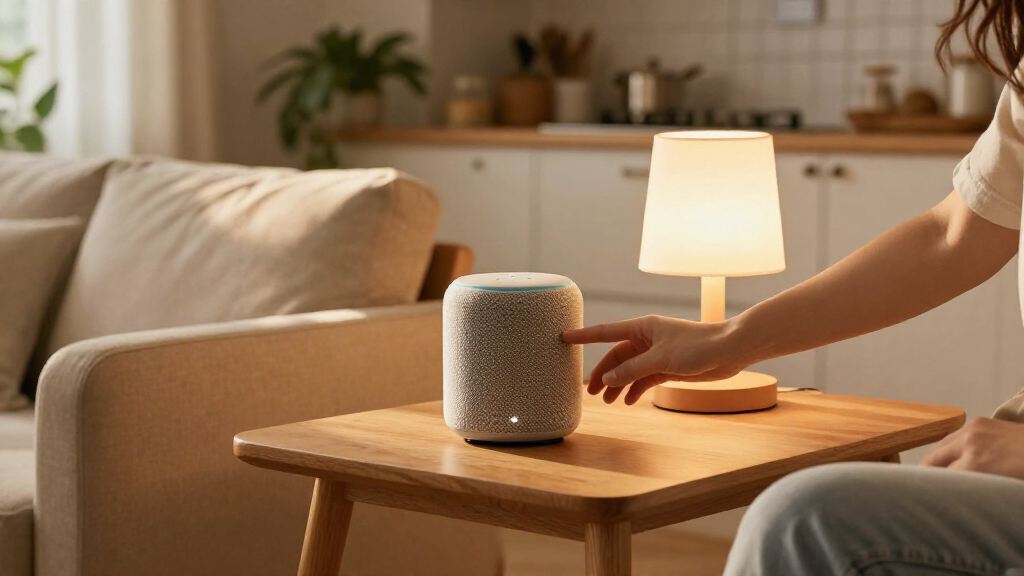

Smart speakers and smart plugs are both approachable smart home gifts, but they solve different problems. A speaker gives its recipient a voice assistant, hands-free controls, and often a convenient way to play music; a plug adds scheduling and remote control to certain devices they already own. That makes the real choice less about which gadget is more advanced and more about what would feel useful in the recipient’s daily routine.

Get the latest gadgets delivered free with Prime
- Fast, free delivery on millions of items
- Prime Video, Amazon Music and more included
- Member-only deals all year

Amazon Echo Show 5 Smart Display with Alexa, Charcoal
- ✔ Display: 5.5-inch touchscreen
- ✔ Camera: 2 MP camera with built-in shutter
- ✔ Dimensions: 5.8 × 3.6 × 3.2 in (147 × 91 × 82 mm)

Amazon Echo Dot (5th Gen) Smart Speaker, Deep Sea Blue
- ✔ Generation: 5th Gen
- ✔ Dimensions: 3.9 × 3.9 × 3.5 in (100 × 100 × 89 mm)
- ✔ Weight: 10.7 oz (304 g)
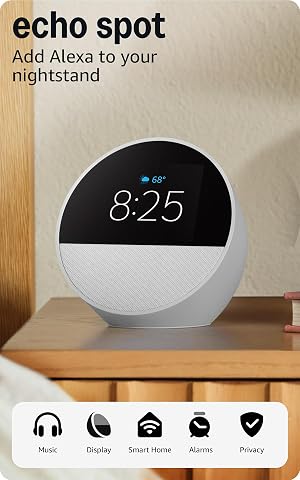
Amazon Echo Spot Smart Alarm Clock, Glacier White
- ✔ Display: 2.83-inch touchscreen, 240 × 320 pixels
- ✔ Camera: None
- ✔ Dimensions: 4.5 × 4.1 × 4.4 in (113 × 103 × 111 mm)
Smart speakers are usually the stronger standalone present for someone who wants music, timers, questions answered, or voice control. Smart plugs are a better fit for a person who already has a compatible phone-based smart home and wants a practical, inexpensive way to automate a lamp. Compatibility, setup, privacy preferences, and the recipient’s willingness to use voice controls matter more than a long feature list. The comparison below focuses on those shared decision points, including where spending more adds real value and where a simple plug is enough.
At a Glance
| Criteria | Smart speakers | Smart plugs | Winner |
|---|---|---|---|
| What the gift adds | Voice assistant, hands-free controls, and music playback on many models | Adds app, schedule, or voice control to a compatible plugged-in device | A |
| Everyday usefulness | Useful for timers, questions, music, and compatible smart home commands | Most useful for lamps and other simple devices that benefit from timed power | Depends |
| Smart home compatibility | Depends on the assistant, model, and supported services | Must match the recipient’s network, platform, and device needs | Depends |
| Setup and recipient effort | Requires account and network setup; voice use is optional | Often straightforward, though app and network setup are still needed | B |
| Privacy and control | Microphone presence may concern some recipients; controls vary by model | Usually controlled by an app or existing assistant; features vary | B |
| Device limitations | Features differ, and voice commands depend on supported devices and services | Does not make every appliance smart or offer voice control by itself | A |
| Typical gift value | Usually costs more, but adds several functions in one device | Usually less expensive; strong value when there is a clear use | Depends |
Amazon Echo Show 5 Smart Display with Alexa, Charcoal
For a gift that should feel useful beyond one narrow routine, the Echo Show 5 is the strongest starting point. Its 5.5-inch touchscreen can put weather, photos, news, shows, and compatible camera feeds in view, so the recipient can glance at information instead of asking Alexa every time. Compared with the Echo Spot’s smaller clock-oriented display, it is better suited to a nightstand or kitchen counter where people may watch content or check a camera feed.The built-in camera makes this the only option here explicitly equipped for video calls, and its physical camera shutter gives privacy-conscious recipients a direct way to cover the lens. A microphone and camera off button adds another control. That makes it a more capable shared-room gift than the Dot, though the Dot’s sensors give it a different advantage for routines based on motion or temperature.The tradeoff is that a screen and camera are only valuable if the recipient wants them and has compatible services and devices. At 5.8 inches wide, it also needs more bedside or counter space than the Dot. Its Wi-Fi does not support ad-hoc or peer-to-peer networks, and certain Bluetooth speaker setups have limits. We’d choose it for the recipient who will use both the display and Alexa controls, and skip it for someone who wants a simple, screen-free speaker.
Pros:
- 5.5-inch screen shows weather, photos, news, shows, and compatible camera feeds.
- Camera supports video calls and includes a physical shutter.
- Controls compatible smart home devices and streams music and shows.
- Uses recycled materials and recyclable packaging.
Cons:
- Does not support ad-hoc or peer-to-peer Wi-Fi networks.
- Bluetooth voice-control and PIN-code speaker compatibility are limited.
Best for: Someone who wants Alexa, a useful touchscreen, compatible camera viewing, and video calls in one compact device.
Not ideal for: A recipient who prefers a screen-free speaker, avoids cameras, or needs ad-hoc or peer-to-peer Wi-Fi support.
Bottom line: Choose the Echo Show 5 when the gift should combine smart home control with the most flexible screen and calling features in this lineup.
“Choose the Echo Show 5 when the gift should combine smart home control with the most flexible screen and calling features in this lineup.”
Amazon Echo Dot (5th Gen) Smart Speaker, Deep Sea Blue
The Echo Dot (5th Gen) makes the most sense when the recipient wants Alexa nearby but does not need a screen. It plays music, podcasts, and audiobooks over Wi-Fi or Bluetooth, and it can control compatible smart home devices by voice. Its small footprint and straightforward speaker role make it an easy addition to a desk, shelf, or bedside table. Compared with the Echo Show 5, it gives up video and glanceable information in exchange for a simpler audio-first setup.What sets this Dot apart from the Echo Spot is the inclusion of motion and indoor temperature sensors. Those can make routines respond to room conditions or presence, giving this speaker a more active role in a compatible smart home than audio control alone. It also supports Matter and Bluetooth Low Energy Mesh compatibility as listed, which can be useful when the recipient is building a mixed-device setup. The Spot, by contrast, has the clearer alarm-clock interface and gradual wake-up routines.Mono audio from a single 1.6-inch driver is the practical limit: this is a compact smart speaker, not a replacement for a dedicated stereo system. The eero extension feature also depends on a compatible eero router and setup, while some skills or services may involve subscriptions or extra fees. We’d pick the Dot for a recipient who values routines and everyday voice access over visual information; those who want an alarm display or video calls should look to the Spot or Show 5.
Pros:
- Streams music, podcasts, and audiobooks over Wi-Fi or Bluetooth.
- Motion and temperature sensors can support more responsive routines.
- Supports voice control for compatible smart home devices.
- Includes a microphone-off button and privacy controls.
Cons:
- Mono audio and a single compact driver limit its role as a room-filling music system.
- eero extension requires a compatible router and setup; some services may have additional fees.
- Bluetooth PIN-code speakers and hands-free voice control for Mac OS X are not supported.
Best for: A smart home beginner or audio-first recipient who wants Alexa routines and room sensing in a compact speaker.
Not ideal for: Someone who wants a display, video calls, stereo sound, or an eero feature that works without a compatible eero router.
Bottom line: Choose the Echo Dot when compact audio and sensor-enabled routines matter more than a screen or camera.
“Choose the Echo Dot when compact audio and sensor-enabled routines matter more than a screen or camera.”
Amazon Echo Spot Smart Alarm Clock, Glacier White
The Echo Spot is the most focused gift in this group: it puts Alexa into the alarm-clock routine rather than trying to be a general-purpose display. Its 2.83-inch screen can show the time, weather, and song titles, while customizable clock faces and gradual light and music wake-ups make it feel tailored to a bedside table. Compared with the larger Echo Show 5, it takes a more clock-centered approach and omits the camera entirely.That camera-free design can suit someone who wants a small screen without a lens in the bedroom. Voice or touch controls can manage compatible smart home devices, and its built-in speaker handles music, podcasts, and audiobooks. The Echo Dot is the better choice if sensor-driven routines and a screen-free format are the priority; the Spot is preferable when visible time and wake-up routines are the main gift value.Its small display naturally offers less room for information than the Show 5, and it is not the choice for video calls or broad visual browsing. The eero Built-in feature sounds useful, but it depends on a compatible eero router, account linking, and the eero app; it should be treated as an extra for the right household rather than a guaranteed benefit. We’d give the Spot to someone who wants a more capable alarm clock, while a recipient seeking an all-around smart display will get more flexibility from the Show 5.
Pros:
- Clock display can show time, weather, and song titles.
- Gradual light and music wake-up routines support a bedside use case.
- Controls compatible smart home devices by voice or touch.
- Has no camera and includes a microphone-off button.
Cons:
- Small display is less suited to video, browsing, or viewing detailed information than the Echo Show 5.
- eero extension requires a compatible router, account linking, and app setup.
- Does not support ad-hoc or peer-to-peer Wi-Fi networks.
Best for: Someone who wants a customizable bedside clock, gradual wake-up routines, and Alexa control in a camera-free device.
Not ideal for: A recipient who wants video calls, a large screen, sensor-rich routines, or eero extension without compatible equipment.
Bottom line: Choose the Echo Spot when a compact, camera-free alarm clock is more appealing than a general smart display or sensor-focused speaker.
“Choose the Echo Spot when a compact, camera-free alarm clock is more appealing than a general smart display or sensor-focused speaker.”
As an Amazon Associate we earn from qualifying purchases.
Key Differences
The biggest difference is what the recipient can do as soon as the gift is set up. A smart speaker can be useful on its own: the recipient can ask for a timer, play music, or use supported voice commands. A smart plug needs a suitable device to control and usually a compatible app, network, or assistant. It can make a favorite lamp easier to manage, but it does not add a general-purpose voice assistant or turn every connected appliance into a smart device.
That extra versatility makes a speaker a more complete gift, but also a more personal choice. Some recipients enjoy speaking to an assistant; others prefer physical switches, avoid microphones, or already have a preferred ecosystem. A plug is more modest and often cheaper, yet it can be more useful when the gift giver knows the recipient wants a lamp to switch on at a set time. In practice, a specific fit beats a larger feature list.
Compatibility is the deciding check for either option. Smart speaker features depend on the chosen model, assistant, and supported services. A plug must suit the recipient’s platform and intended device, and its controls may vary by product. Check the product details before buying, particularly if the recipient already uses smart home equipment. If you cannot identify a compatible device or a clear automation need, a speaker is generally the safer standalone present for someone comfortable with voice control.
Detailed Comparison
What the gift adds (Smart speakers wins — major)
A smart speaker adds an assistant that may handle music, timers, questions, and supported device commands. A smart plug adds control over a suitable device the recipient already owns. The speaker wins by a major margin as a self-contained gift: it has several possible uses without requiring the recipient to own a particular lamp or appliance. The plug wins when the recipient specifically wants to automate an existing device; outside that use, its contribution is limited.
Everyday usefulness (moderate difference)
A speaker can serve different routines: a kitchen timer, music while getting ready, or a voice command for a supported smart light. A plug is narrower, but scheduling a lamp can be genuinely convenient, especially when the switch is awkward to reach. This is a moderate, use-dependent gap. Choose the speaker for varied daily tasks; choose the plug when you know the recipient has a device they want to control on a schedule.
Smart home compatibility (major difference)
Both products depend on compatibility, though the checks differ. A speaker’s assistant must work with the recipient’s services and devices; a plug must work with their network and intended appliance. Neither category is a universal fit, and model features vary. This is a major practical consideration but not a category win. If the recipient already has a preferred platform, match the gift to it; if you cannot verify compatibility, favor a returnable option or choose a non-connected gift.
Setup and recipient effort (Smart plugs wins — minor)
A plug can be the simpler gift when it only needs pairing and a schedule for one lamp. A smart speaker generally needs account and network setup before the assistant works. Both require a phone or app for at least some initial configuration, and the exact steps depend on the product. Smart plugs take a minor-to-moderate lead for a basic use, but only if the recipient is comfortable with setup and has a compatible device. For someone who dislikes app configuration, neither is a sure bet.
Privacy and control (Smart plugs wins — moderate)
Smart speakers include microphones for voice interaction, which some recipients may not want in their home. Available mute controls and privacy settings vary by model, so check those details if privacy is a concern. A smart plug typically avoids adding a voice microphone, although app control may involve an account and connected service. The plug wins by a moderate margin for recipients who prefer to avoid voice assistants. A speaker remains a reasonable choice for someone who values hands-free controls and is comfortable with its settings.
Device limitations (Smart speakers wins — major)
A smart speaker can offer functions beyond smart home control, particularly music and voice assistance, though capabilities differ by model. A plug only controls power to a suitable connected device; it cannot add intelligence to every appliance or operate a device whose settings require more than power being switched. The speaker wins by a major margin for breadth. Before gifting a plug, check that the intended device is suitable for plug-based control and that the recipient actually wants to automate it.
Typical gift value (moderate difference)
Smart plugs usually cost less, making them a sensible small gift when there is a known use. A smart speaker costs more, but can justify the difference if the recipient will use its assistant or audio features. This is a moderate, recipient-dependent gap: the speaker is better value when several features will see regular use; the plug is better value when one simple schedule solves a real annoyance. Paying more for functions the recipient will ignore is poor value in either case.
Smart speakers: Pros and Cons
Pros:
- Combines voice assistance with music and hands-free tasks on many models.
- Can be useful without a separate smart appliance.
- May control compatible smart home devices through supported services.
Cons:
- Costs more than a basic smart plug.
- Microphones and voice interaction may not suit every recipient.
- Assistant features and device support vary by model and ecosystem.
Smart plugs: Pros and Cons
Pros:
- Usually costs less and can make a familiar lamp easier to schedule.
- Does not add a voice microphone to the room.
- Works well as a focused gift when the recipient has a specific automation in mind.
Cons:
- Needs a suitable device and compatible network or smart home setup.
- Offers narrower functionality than a smart speaker.
- Does not make every appliance smart or add voice assistance on its own.
Who Should Choose What
Choose Smart speakers if:
- The recipient would use music, timers, or voice assistance as well as smart home controls.
- You want a standalone gift with several possible uses.
- You know the recipient is comfortable with the speaker’s assistant and privacy settings.
Choose Smart plugs if:
- The recipient has a compatible lamp or other suitable device they want to control remotely or on a schedule.
- You want a lower-cost, practical gift tied to a known need.
- The recipient prefers app or existing-platform control over adding a voice assistant.
Skip both if: The recipient avoids connected devices, does not want app setup, or you cannot confirm compatibility and have no clear use for either gadget.
Value for Money
A smart plug is the better value when the gift solves a specific, modest problem. If the recipient wants a bedside lamp to switch on at a set time, the lower cost can buy exactly the useful feature they need. A smart speaker is worth paying more for when the recipient will use several functions, such as music, timers, and voice commands. Its higher price buys broader use, not automatically better value.
Before spending more, match the speaker’s assistant to the recipient’s habits and check whether its audio and voice features suit them. Before choosing a plug, identify the device it will control and check product compatibility. If either check fails, a cheaper price does not rescue the gift. For a recipient whose preferences are unknown, a smart speaker has more possible uses, but its microphone and ecosystem make it a less neutral present than the price alone suggests.
Final Verdict
For most recipients who are comfortable with voice assistants, a smart speaker is the stronger all-around gift: it can serve as an audio device and everyday helper, then add control for compatible smart home products. Choose a smart plug when you know the recipient has a suitable device and a real reason to schedule or control it. That is the better value for a narrow, practical need.
The deciding factor is whether the recipient wants a new assistant or a simple way to control something they already own. If you know the answer, buy for that habit rather than the longest feature list. If you do not, a speaker has broader potential, while a plug is the safer choice only when you can name the device it will improve.
Frequently Asked Questions
Which is the better smart home gift for someone new to connected devices?
A smart speaker is usually the more complete starting point if the person is comfortable with voice controls and account setup. A plug is easier to recommend when you know they have a suitable lamp and want to schedule it. Either product may require app and network setup, so consider the recipient’s comfort with that process.
Is a smart plug useful without a smart speaker?
Often, yes. Many plugs can be controlled through a compatible app or schedule, though features vary by product. A speaker can add voice control if the plug supports that assistant, but it is not always required for basic timed use.
Should I pay more for a smart speaker?
Pay more when the recipient will use its assistant, audio, or hands-free features regularly. If the only goal is to switch a suitable lamp on a schedule, a compatible plug is usually the better-value purchase.
What should I check before buying either gift?
Check the recipient’s existing smart home platform and network needs, then confirm the product supports them. For a plug, also confirm the intended device is suitable for power-based control. For a speaker, consider whether the recipient wants a voice assistant and is comfortable with a microphone in the room.