
Choose a smart home gadget that fits the recipient’s home, devices, and comfort with technology. This guide is for anyone buying a practical connected-home gift, including first-time smart home shoppers. You will check compatibility, compare suitable device types, and prepare the gift so the recipient can set it up with less guesswork. Allow 30-60 minutes to research and choose; installation may take longer.

Get the latest gadgets delivered free with Prime
- Fast, free delivery on millions of items
- Prime Video, Amazon Music and more included
- Member-only deals all year

Amazon Echo Show 5 Smart Display with Alexa, Charcoal
- ✔ Display: 5.5-inch touchscreen
- ✔ Camera: 2 MP with built-in shutter
- ✔ Speaker: 1.75-inch full-range built-in speaker
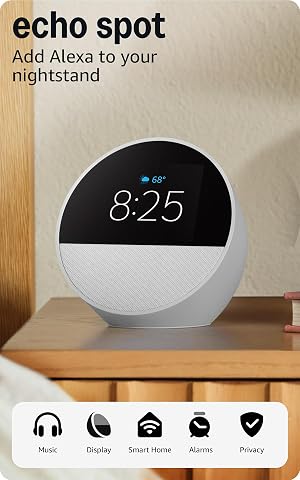
Amazon Echo Spot Smart Alarm Clock, Glacier White
- ✔ Display: 2.83-inch touchscreen, 240 × 320 pixels
- ✔ Camera: None
- ✔ Speaker: 1.73-inch full-range built-in speaker

Amazon Echo Dot (5th Gen) Smart Speaker, Deep Sea Blue
- ✔ Generation: 5th Gen
- ✔ Driver: 1.6-inch full-range driver
- ✔ Audio bandwidth: 62 Hz–19 kHz
Difficulty: Beginner | Time: 30-60 minutes to research and choose; setup time varies by device
What You’ll Need
Tools & Materials:
- A phone or computer with internet access
- The recipient’s permission to ask about their devices and home setup, if needed
- A list of possible gift options and your budget
Knowledge:
- Basic familiarity with smartphone apps and Wi-Fi
- A general idea of the recipient’s interests, routines, or household needs
Smart devices can depend on a particular phone platform, smart home hub, Wi-Fi band, or subscription. Check the product’s current requirements before buying. Avoid asking for passwords or account access; the recipient should connect the device to their own accounts.
Amazon Echo Show 5 Smart Display with Alexa, Charcoal
The Echo Show 5 makes the broadest smart home gift because it combines Alexa controls with a screen that can show news, weather, photos, compatible camera feeds, and video calls. That makes it more useful as a shared household device than the Echo Dot, which keeps its interaction audio-first. Its 5.5-inch touchscreen also gives a recipient a visual way to check information or manage compatible devices without relying on voice commands every time.Compared with the Echo Spot, the Show 5 has a larger screen and a built-in camera, so it suits desks and counters where video calls or camera viewing matter. The tradeoff is that its camera and broader screen use call for a little more thought about placement and privacy. A physical camera shutter and microphone-off button help, but buyers should consider whether the recipient actually wants a camera-equipped device in the room. It also does not support ad-hoc or peer-to-peer Wi-Fi networks, a limitation that may matter in less typical network setups.As a gift, this is our strongest all-rounder when we know the recipient wants a visual hub rather than just another speaker. The recycled materials and recyclable packaging are a welcome detail, though they do not change the device’s main advantage: it brings more kinds of household information together than the Spot or Dot.
Pros:
- 5.5-inch screen displays news, weather, photos, shows, and compatible camera feeds.
- Built-in camera supports video calls and includes a physical shutter.
- Combines compatible smart home control with music and show streaming.
- Uses recycled materials and recyclable packaging.
Cons:
- Camera and display make it a less discreet choice than the Echo Dot.
- Does not support ad-hoc or peer-to-peer Wi-Fi networks.
- Hands-free Bluetooth voice control is not supported for Mac OS X devices.
Best for: People who want an Alexa device for a kitchen, desk, or shared room and will use video calls or compatible camera feeds.
Not ideal for: Anyone who prefers a screen-free speaker, does not want a camera in the room, or relies on an ad-hoc or peer-to-peer Wi-Fi network.
Bottom line: We recommend the Echo Show 5 as the most adaptable gift here when the recipient will make use of its screen and camera.
“We recommend the Echo Show 5 as the most adaptable gift here when the recipient will make use of its screen and camera.”
Amazon Echo Spot Smart Alarm Clock, Glacier White
The Echo Spot gives Alexa a clear bedside role. Its compact touchscreen centers the time, weather, and song titles, while customizable clock displays and gradual wake-up routines make alarms feel more tailored than a basic speaker’s. We see it as a more focused gift than the Echo Show 5: it is designed around waking up and checking the time, rather than calls and camera feeds.That focus is also its main tradeoff. The Spot has a 2.83-inch screen and no camera, so it cannot match the Show 5 for video calls or visual browsing. For a bedside table, though, the smaller display may be an advantage: it keeps the device oriented toward the clock and routines instead of trying to be a general-purpose household screen. The built-in speaker handles music, podcasts, and audiobooks, while voice or touch can control compatible smart home devices.The Spot can extend a compatible eero network, but buyers should not treat that as a standard feature for every recipient. It requires a compatible eero router, account linking, and the eero app. It also has a microphone-off button and in-app privacy controls. Compared with the Dot, it is the better gift when the recipient wants a visible bedside clock; compared with the Show 5, it is the more restrained choice for a room where a camera is unnecessary.
Pros:
- Customizable touchscreen shows the time, weather, and song titles.
- Alexa routines support gradual light and music wake-ups.
- Controls compatible smart home devices by voice or touch.
- Includes a microphone-off button and in-app privacy controls.
Cons:
- Small display is less suited to broad visual use than the Echo Show 5.
- Has no camera for video calls or camera viewing.
- eero extension requires compatible hardware, account linking, and app setup.
Best for: People who want an Alexa-enabled bedside clock with customizable displays, alarms, and gradual wake routines.
Not ideal for: People who want video calls, a larger information screen, or eero network extension without owning a compatible eero router.
Bottom line: We would choose the Echo Spot for someone whose smart home gift should earn its place on a bedside table as both clock and Alexa device.
“We would choose the Echo Spot for someone whose smart home gift should earn its place on a bedside table as both clock and Alexa device.”
Amazon Echo Dot (5th Gen) Smart Speaker, Deep Sea Blue
The Echo Dot (5th Gen) is the simplest gift for someone who wants Alexa around the home without adding a screen. It plays music, podcasts, and audiobooks over Wi-Fi or Bluetooth, and it can control compatible smart home devices with voice commands and routines. Its motion and indoor temperature sensors set it apart from the Echo Spot and Show 5 descriptions: they can make the Dot more useful in routines that respond to room conditions, not just a spoken request.Compared with the Echo Spot, the Dot gives up the clock display and gradual wake experience, so it is a weaker bedside gift for someone who likes visual cues. Compared with the Show 5, it also lacks a touchscreen and camera. In return, its smaller, screen-free format is easier to place in a room where the gift recipient wants audio and voice control without another display to manage.The Dot includes eero network extension features for compatible setups, but, as with the Spot, that benefit depends on an eero router and additional setup. Its mono speaker is designed around a single full-range driver, so buyers focused on a visual experience should look to the Show 5, and those choosing specifically for wake routines should look to the Spot. Some skills and services may require a subscription or additional fees; that is worth bearing in mind when gifting a device that may prompt the recipient to add services later.
Pros:
- Plays music, podcasts, and audiobooks over Wi-Fi or Bluetooth.
- Supports voice control and routines for compatible smart home devices.
- Built-in motion and indoor temperature sensors add routine options.
- Includes a microphone-off button and other privacy controls.
Cons:
- No screen for a clock, weather glance, or visual camera feed.
- eero extension requires a compatible eero router and setup in its app.
- Some skills and services may require subscriptions or additional fees.
Best for: People who want a compact Alexa speaker for audio, compatible smart home routines, and sensor-based triggers without a display.
Not ideal for: People who want a visual clock, video calls, or a larger screen for checking household information.
Bottom line: We recommend the Echo Dot for a recipient who values compact audio and smart routines more than a screen or bedside display.
“We recommend the Echo Dot for a recipient who values compact audio and smart routines more than a screen or bedside display.”
As an Amazon Associate we earn from qualifying purchases.
Before You Start
Set a budget that includes any hub, subscription, batteries, or other accessories the device may need. Think about privacy and placement: cameras, microphones, locks, and other devices that collect data or control access are personal gifts. Choose those only when the recipient has expressed interest. If the gift is a surprise, favor a low-risk item that can be returned or exchanged.
Step-by-Step Instructions
Step 1: Identify a useful problem to solve
Write down one task or routine the recipient might want to make easier, such as turning lights off, checking the weather, hearing music, or managing a morning routine. Pick a gift that supports that task rather than choosing a gadget only because it has many features. If you are unsure, ask what they would actually use or ask someone familiar with their setup.
Tip:Consider whether the recipient rents, shares their home, or prefers not to change existing fixtures. Plug-in devices are usually easier to install and remove than wired switches or locks.
Check: You can describe the gift’s practical benefit in one sentence and connect it to something the recipient does.
Step 2: Check the recipient’s smart home setup
Find out which phone platform and smart home system the recipient uses, if any. Check whether they have an iPhone or Android phone, a voice assistant or hub, and reliable Wi-Fi where the device will go. If you cannot ask, use product requirements and choose a device that clearly supports common setups, with a straightforward return policy.
Tip:Compatibility labels can be specific. Confirm the exact platform and model requirements on the manufacturer’s product page, rather than relying on a retailer’s broad category label.
Check: You have a short list of the recipient’s relevant devices or a backup plan if their setup is unknown.
Step 3: Choose a suitable device category
Match the recipient’s needs and setup to a device type. Smart bulbs or plugs can suit someone who wants simple lighting control; a speaker may suit someone who listens to music or uses voice commands; a sensor can help with a specific household routine. Consider a thermostat, camera, or smart lock only when you know the home supports it and the recipient wants that kind of device.
Tip:Think about installation effort and household rules. A renter may not be able to replace a thermostat or lock, and a shared household may need agreement before adding cameras or microphones.
Check: The device category fits both the task and the recipient’s home, and does not require an unwanted installation.
Step 4: Compare compatibility and ongoing costs
Open the manufacturer’s specifications for each candidate. Check supported platforms, Wi-Fi requirements, hub requirements, required app, subscription costs, and whether core features work without a paid plan. Confirm what is included in the box and whether the device receives security updates. Compare the full cost over the first year, not only the purchase price.
Tip:Some products need a separate hub or charge for video storage and advanced features. Check whether the basic use you have in mind works without a subscription.
Check: You have confirmed that the recipient can use the main features with their setup and that the total cost fits your budget.
Step 5: Read reviews for everyday use
Read recent owner reviews and look for repeated reports about setup, connection dropouts, app reliability, or limited compatibility. Give more weight to reviews that describe the same use case you have in mind. Check the return window and warranty terms so the recipient has a clear option if the device does not suit their home.
Tip:One dramatic review may describe an unusual case. Look for the same problem reported by several owners and check whether the manufacturer has addressed it.
Check: You know the main trade-offs, the return deadline, and where the recipient can get product support.
Step 6: Buy the device and include setup information
Buy from a seller with clear return terms. Keep the receipt or gift receipt, and include a short note naming the device’s app and any hub or accessory it needs. Do not include your own login details or preconfigure the gift on your personal account. Let the recipient connect it to their own account and choose their privacy settings.
Tip:If setup may be difficult, offer to help in person or point to the manufacturer’s official setup guide. Do not request the recipient’s password.
Check: The gift includes its required accessories or a clear note about anything else needed, and the recipient has a way to return or exchange it.
Step 7: Help with setup if the recipient wants
Ask before helping install or connect the device. Follow the manufacturer’s setup steps, use the recipient’s phone and account, and connect the device to the intended Wi-Fi network. Review permissions together, especially access to location, contacts, audio, video, or notifications. Test the main feature before finishing.
Tip:Do not share Wi-Fi or account credentials in a gift note. If setup calls for a firmware update, allow it to finish before unplugging or resetting the device.
Check: The device appears in the recipient’s app, its intended feature works, and the recipient knows how to disable or adjust it.
Common Mistakes to Avoid
- Buying a device that does not work with the recipient’s phone or home system. — Check the manufacturer’s exact compatibility list and any hub or Wi-Fi requirements before purchasing.
- Choosing a camera, microphone, or access-control device as a surprise. — Ask first about interest, placement, and household agreement; choose a less sensitive gift if you cannot check.
- Overlooking subscriptions or required accessories. — Check which features need a paid plan, hub, bridge, batteries, or other equipment, and include those costs in your budget.
- Setting up the gift on the buyer’s account. — Let the recipient register the device with their own account and review its permissions themselves.
Troubleshooting
Problem: The device does not appear in the recipient’s app.
Solution: Check that the app matches the product, the phone is on the required Wi-Fi network, and the device is powered and in pairing mode. Follow the manufacturer’s pairing instructions; avoid repeated factory resets unless the guide calls for one.
Problem: The device cannot connect to Wi-Fi.
Solution: Check the product’s supported Wi-Fi bands and network requirements. Move it closer to the router during setup, confirm the network password on the recipient’s device, and check whether router settings such as a guest network prevent setup.
Problem: A feature asks for a subscription or hub the recipient does not have.
Solution: Check whether the desired feature works without that extra service. If not, compare the added cost with your budget or use the return window to choose a simpler compatible device.
Problem: The device connects but its main feature does not work.
Solution: Confirm that the device has current firmware, the app has the required permissions, and any linked assistant or hub is set up. Test the feature close to the router, then consult the manufacturer’s support page if the issue continues.
What Success Looks Like
The selected gift supports a real task the recipient cares about, works with their phone and home setup, and has no hidden cost or installation requirement that makes it unsuitable. The recipient can return or exchange it, connect it to their own account, adjust privacy settings, and use its main feature successfully.
Next Steps
Keep the gift receipt and note the return deadline for the recipient. If they set up the device, encourage them to install official updates and review account security and privacy settings. They can add automations or connect other devices later, once they know the gift works reliably.
Frequently Asked Questions
What is a good smart home gift if I do not know the recipient’s setup?
Choose a simple, low-cost device with broad compatibility, minimal installation, and a clear return policy. A plug-in light or smart plug may fit some homes, but check the product’s requirements first.
Do smart home gadgets need a hub?
Some connect directly to Wi-Fi or a phone, while others need a separate hub or bridge. Check the product specifications and include the required equipment in your purchase plan.
Should I set up a smart gadget before giving it?
Usually, let the recipient set it up using their own phone and account. You can offer help after asking, but avoid registering it under your account or sharing credentials.
How can I tell whether a device has ongoing costs?
Read the product page and subscription terms. Check whether the basic function works without a paid plan and whether features such as video history, alerts, or cloud storage cost extra.